
Streamline cost estimates and budgets with collaborative tools and resource assignments.
Real-time schedule viewing, analysis, and status updates without editing.
Monitor progress and performance with integrated EVM metrics and reports.
Risk Register, heat maps, Monte Carlo simulations, and schedule risk analysis.
Manage changes with scenario planning, workflows, and impact assessments.
Dozens of reports. Multiple layouts, charts, graphs, and pivot-style analysis, all built in.
More than software. Expert project controls guidance, grounded in decades of hands-on experience across projects of every size and complexity.
From PMCS implementation to project closeout, we train your team the same way we train our own, to be experts.
Real projects. Real results. What worked, what didn't, and what we learned.
When every dimension of your project lines up, the answer is yes. We help you get there.

Trusted by the World’s Most Complex Projects
We’ve Been Where You’re Going
Access on-demand sessions on project controls, EVM, and best practices for complex projects.
Read insights on Dash360 solutions and project management for big science and technology endeavors.
Tune into expert discussions on building high-performing teams and achieving project success.
Stay informed with the latest announcements and updates from Dash360.
Download detailed guides on cost estimating, risk management, and project lifecycle strategies.
Get to know the experts driving Dash360's innovative project management solutions.
Join talented professionals working on groundbreaking projects
From 1980s project controls pioneers to modern innovators in complex project management.
Reach out for inquiries, support, demos, or partnerships

Meet the Dash360 Team
Streamline cost estimates and budgets with collaborative tools and resource assignments.
Real-time schedule viewing, analysis, and status updates without editing.
Monitor progress and performance with integrated EVM metrics and reports.
Risk Register, heat maps, Monte Carlo simulations, and schedule risk analysis.
Manage changes with scenario planning, workflows, and impact assessments.
Dozens of reports. Multiple layouts, charts, graphs, and pivot-style analysis, all built in.
More than software. Expert project controls guidance, grounded in decades of hands-on experience across projects of every size and complexity.
From PMCS implementation to project closeout, we train your team the same way we train our own, to be experts.
Real projects. Real results. What worked, what didn't, and what we learned.
When every dimension of your project lines up, the answer is yes. We help you get there.
Trusted by the World’s Most Complex Projects
We’ve Been Where You’re Going
Access on-demand sessions on project controls, EVM, and best practices for complex projects.
Read insights on Dash360 solutions and project management for big science and technology endeavors.
Tune into expert discussions on building high-performing teams and achieving project success.
Stay informed with the latest announcements and updates from Dash360.
Download detailed guides on cost estimating, risk management, and project lifecycle strategies.
Get to know the experts driving Dash360's innovative project management solutions.
Join talented professionals working on groundbreaking projects
From 1980s project controls pioneers to modern innovators in complex project management.
Reach out for inquiries, support, demos, or partnerships
Meet the Dash360 Team
Cost estimating on complex projects has a way of becoming chaotic. Spreadsheets multiply, versions diverge, and getting everything into one coherent picture requires a painful collection and re-entry cycle where bottlenecks inevitably form as deadlines approach.
Less chasing. Less rework. One version of the truth.
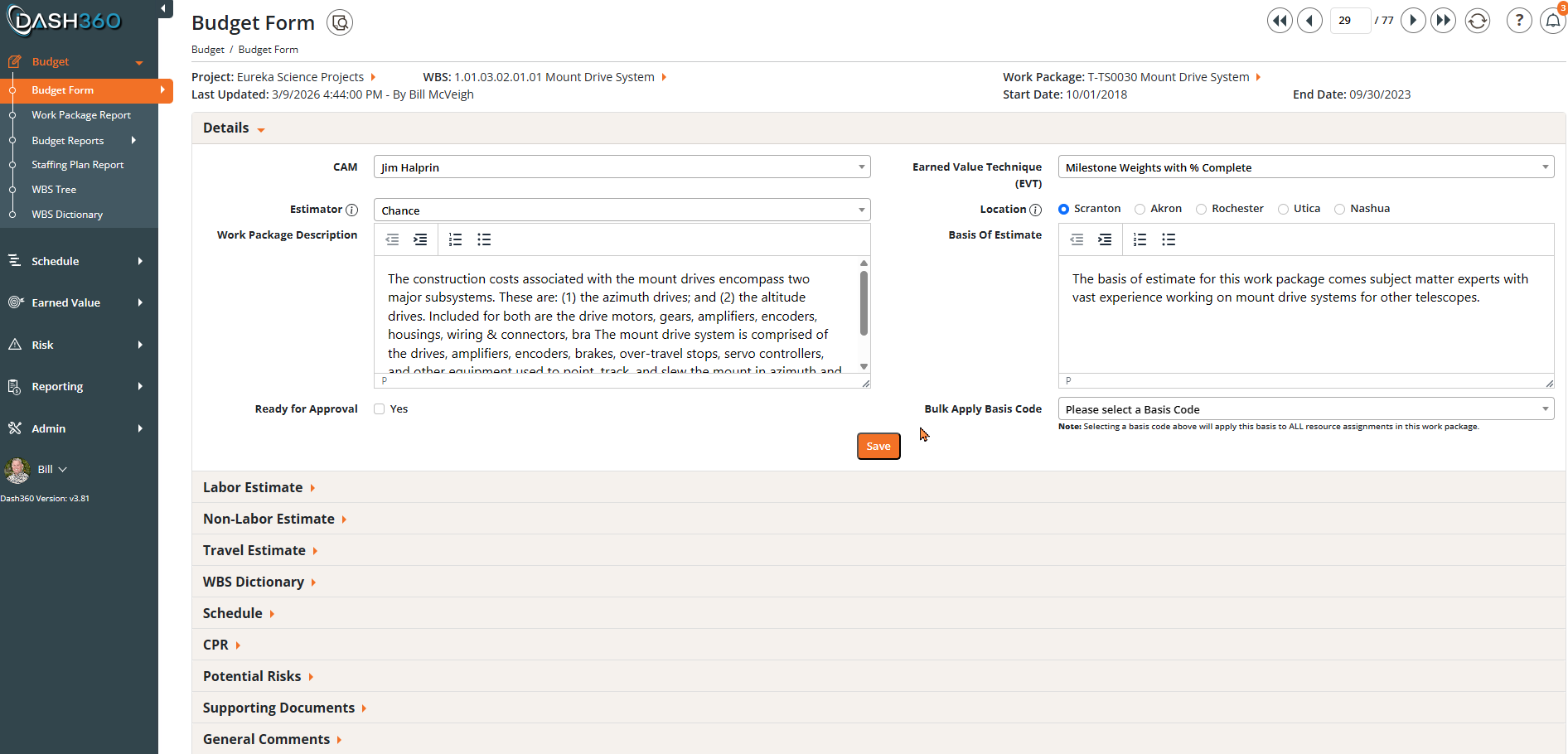
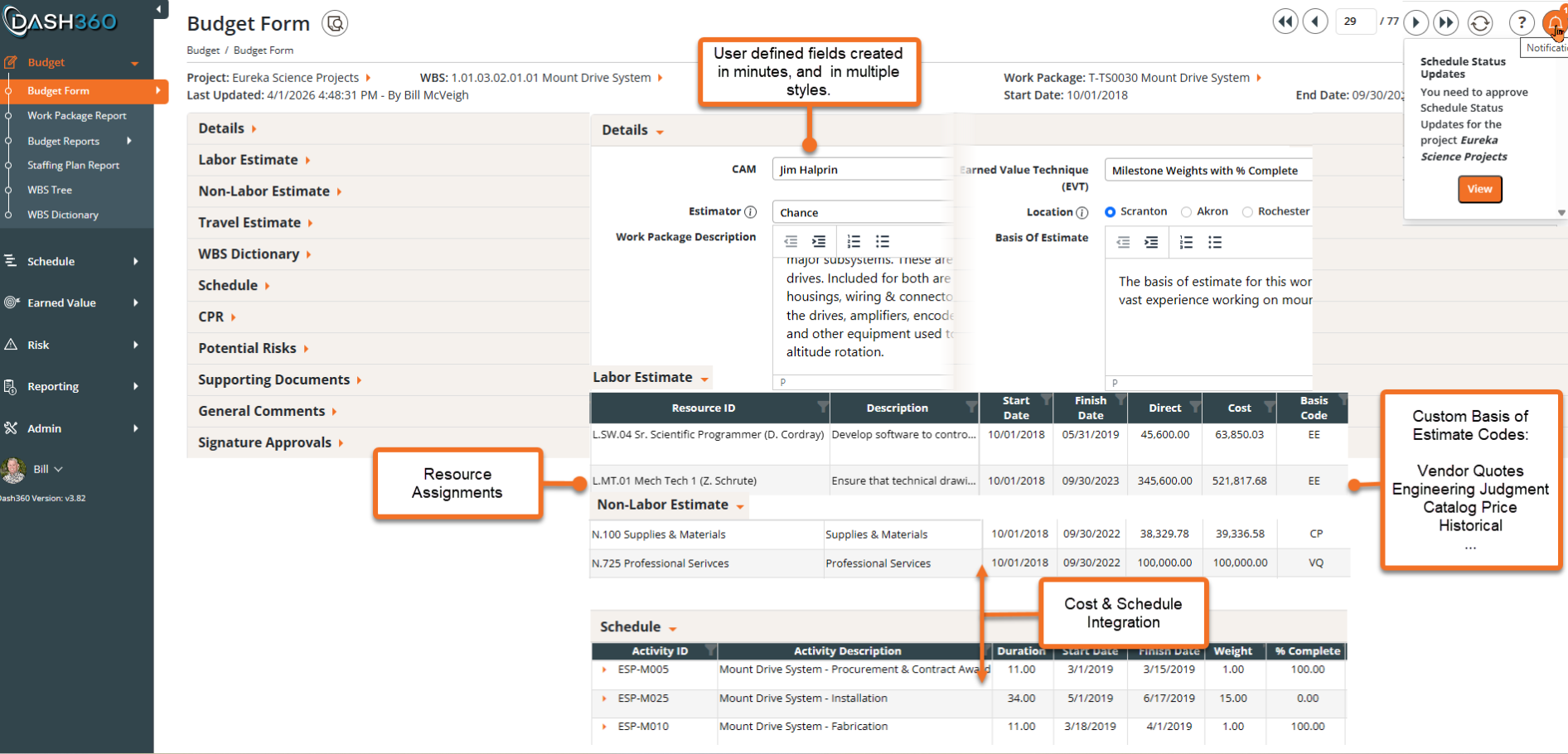
The Budget Form is the heart of the Dash360 cost estimating and budgeting workflow. It is where estimates and budgets take shape, resources get assigned, and every dollar finds its place in the project plan. Built the Way Your Organization Works as no two projects are alike, and no two organizations budget and track costs the same way. Dash360 is built with that reality in mind. Add a custom field in seconds, no development work, no support ticket, no waiting.
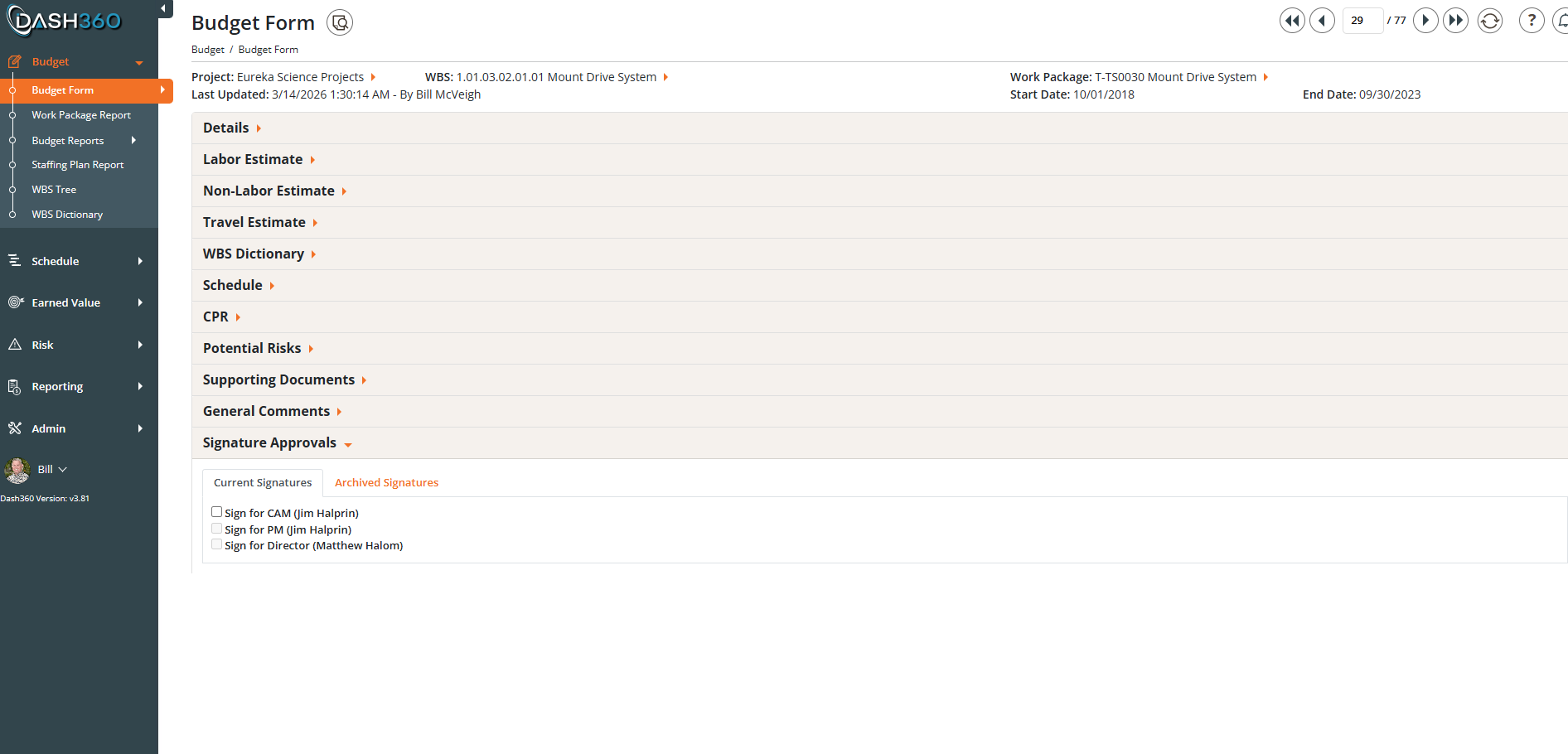
The Budget Form is organized into collapsible accordion sections so your workspace stays focused. Details, WBS Dictionary, Resource Assignments, Schedule, CPR, Risk Factors, Potential Risks, Supporting Documents, Comments, and Signature Approvals can freeze the entries so they can be approved and no changes can be made.
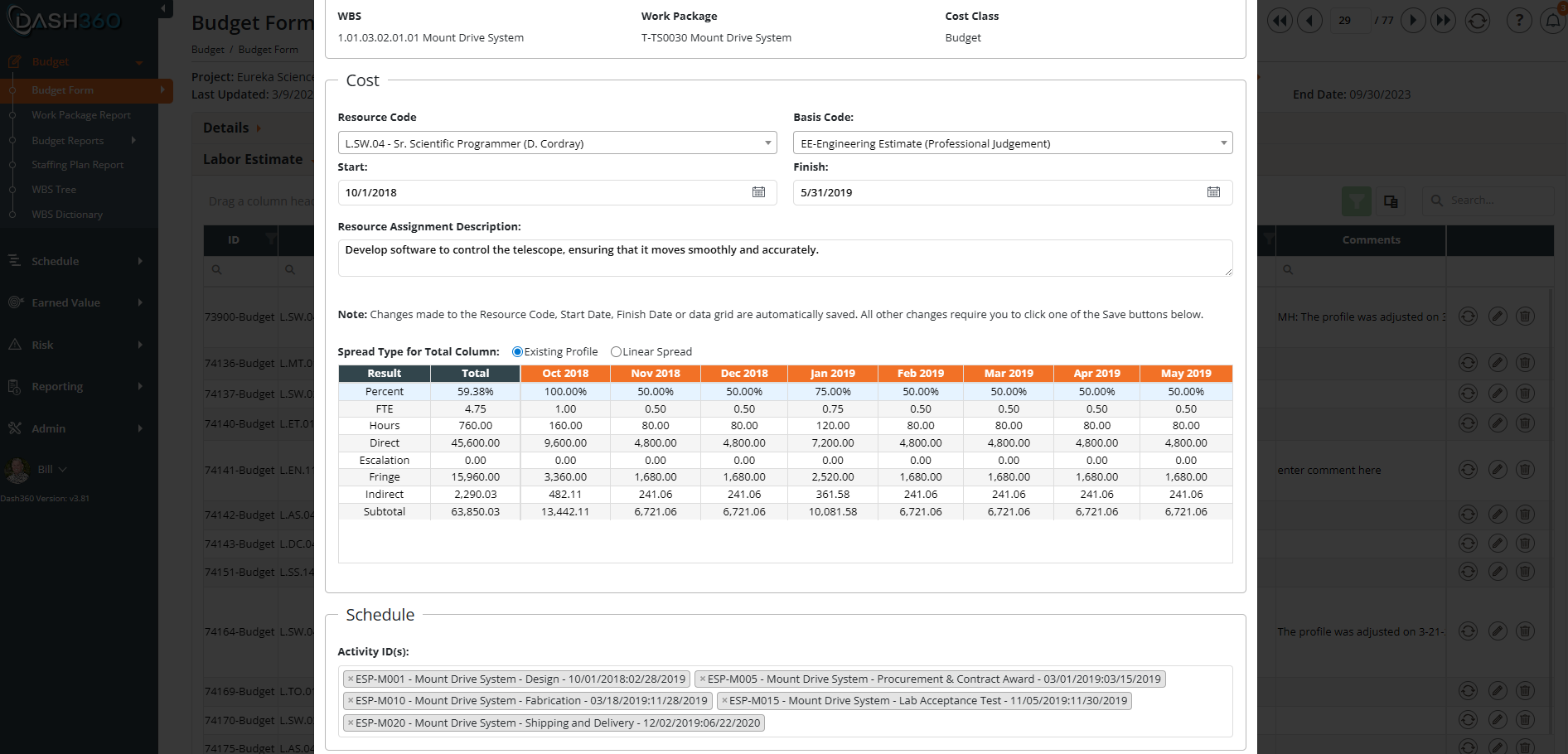
Whether your team prefers to work directly in the Dash360 interface or bring data in from Excel, the Budget Form supports both. The intuitive interface provides a quick way to linearly spread costs evenly month over month in one click, or assign specific values to any month to build a profile that reflects how work actually happens. And with a robust Excel import/export feature users can use Excel for creating spend plans.
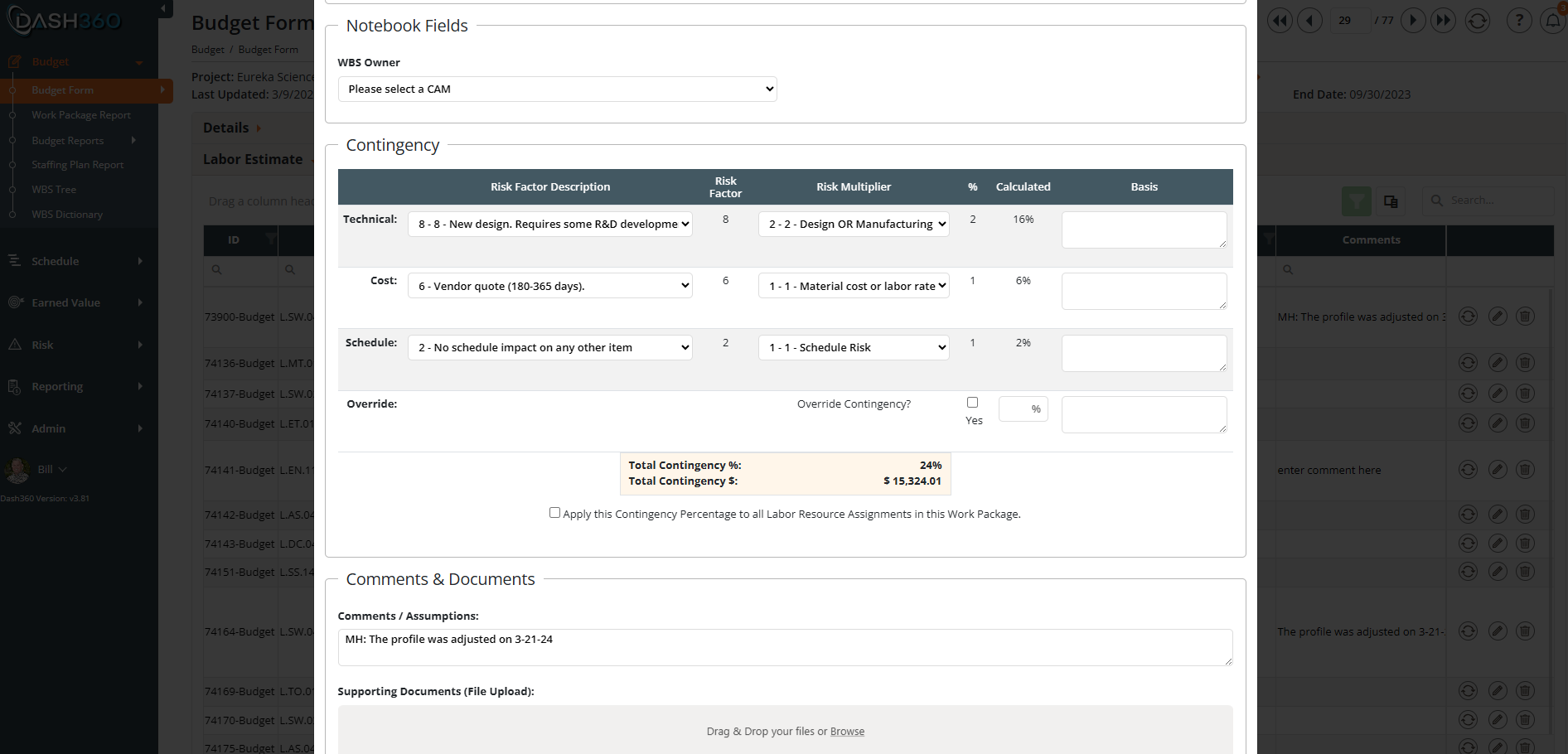
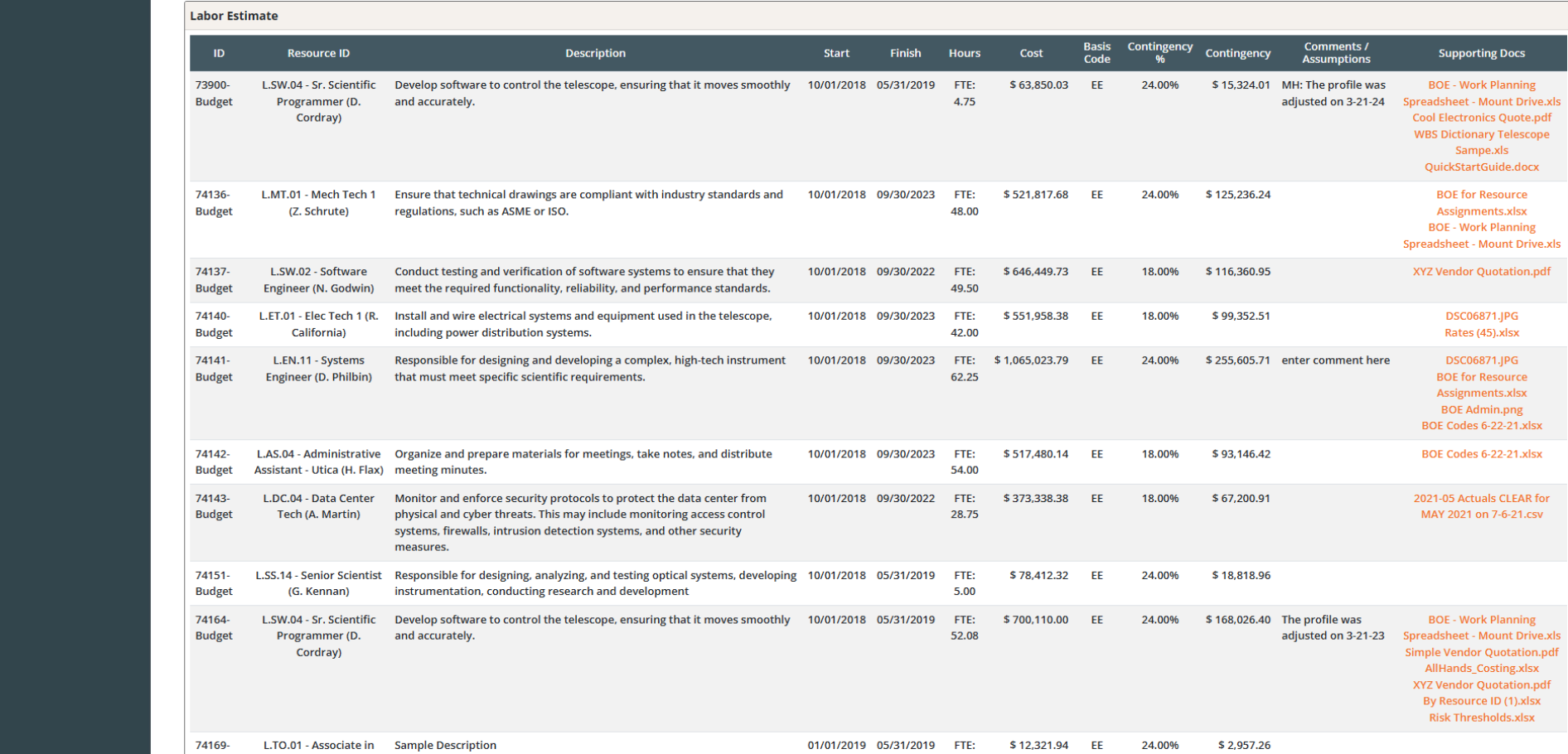
Every resource assignment carries as much detail as your project demands. Enter basis of estimate narratives, contingency factors & multipliers, comments, supporting documents, and more, keeping all the context right where it belongs.
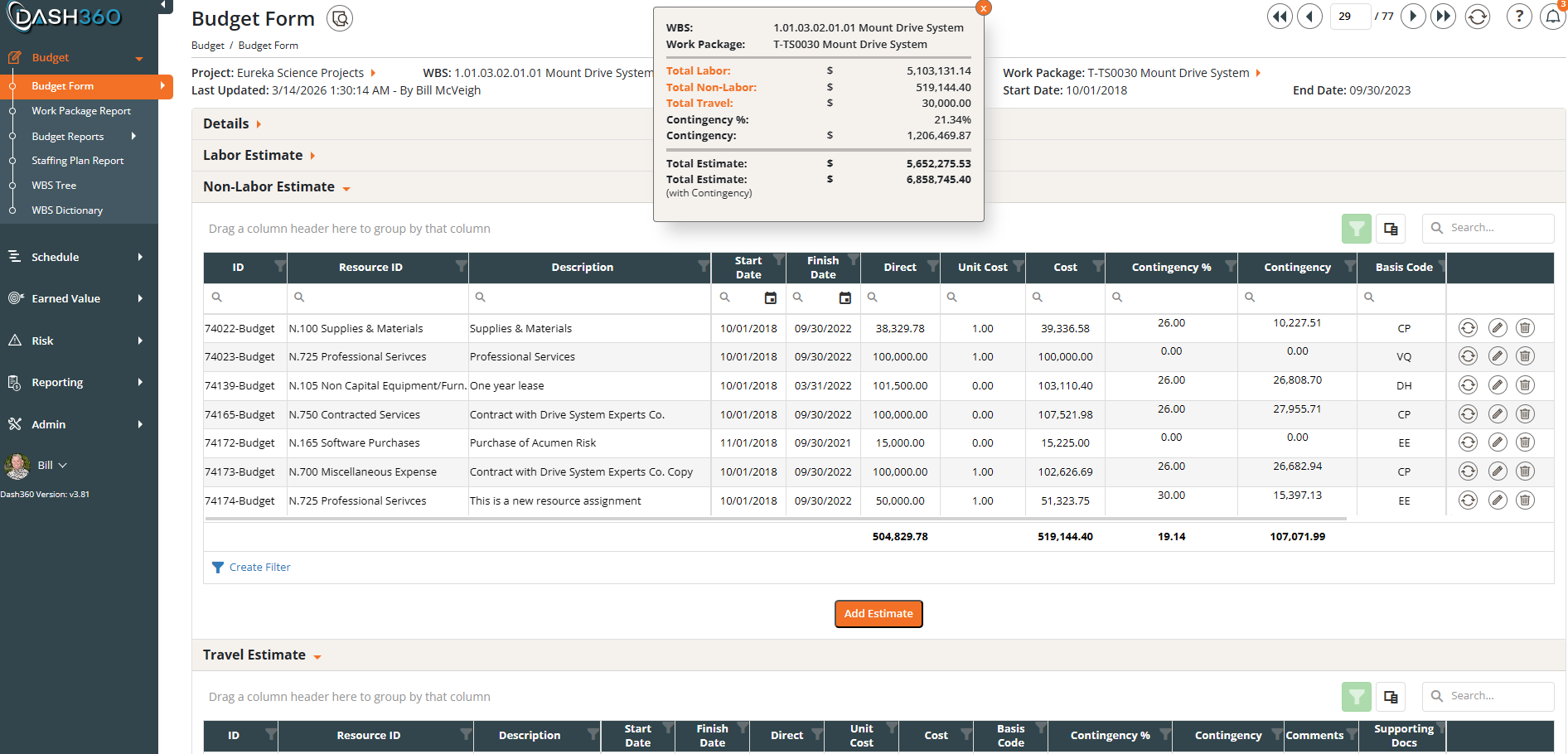
At-a-glance budget rollup, right where you need it. The sticky note summary floats on the page as you scroll, keeping total labor, non-labor, and travel costs alongside contingency value and total estimate always visible. Build your non-labor estimate line by line with direct costs, unit pricing, contingency amounts, and basis codes all captured in one place, giving your team the full picture without ever leaving the form.
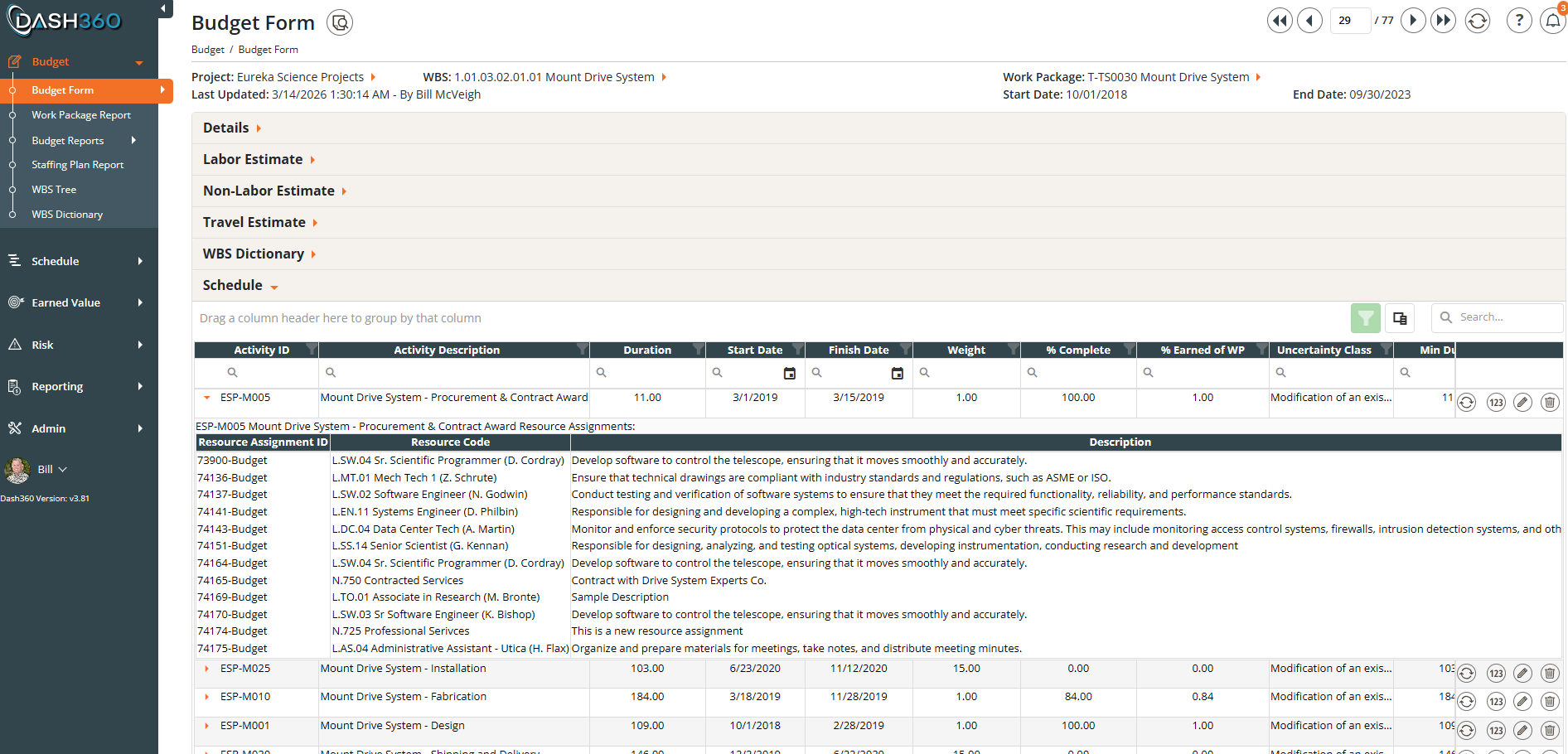
See exactly which resources are assigned to each activity in the schedule. The Schedule section of the Budget Form expands each activity to show its full list of resource assignments, linking your cost estimate directly to the work being performed so there’s no disconnect between the budget and the schedule. With duration, percent complete, and earned value all visible alongside the resource detail, your team has everything needed to assess progress and cost performance in one place.
When the estimate is ready, Dash360’s Signature Approval workflow takes over. Entries are frozen the moment an estimate enters the approval cycle, advancing it toward a formal Work Authorization Document. Reviewers and approvers can sign with confidence knowing the numbers have not changed under their feet. Every step in the chain is documented, timestamped, and tied to the cost on record at that moment.
Need To Make A Change? Restart the sign-off process to unlock the work package and make changes again. Dash360 will keep track of previous signoffs including dates & total cost.
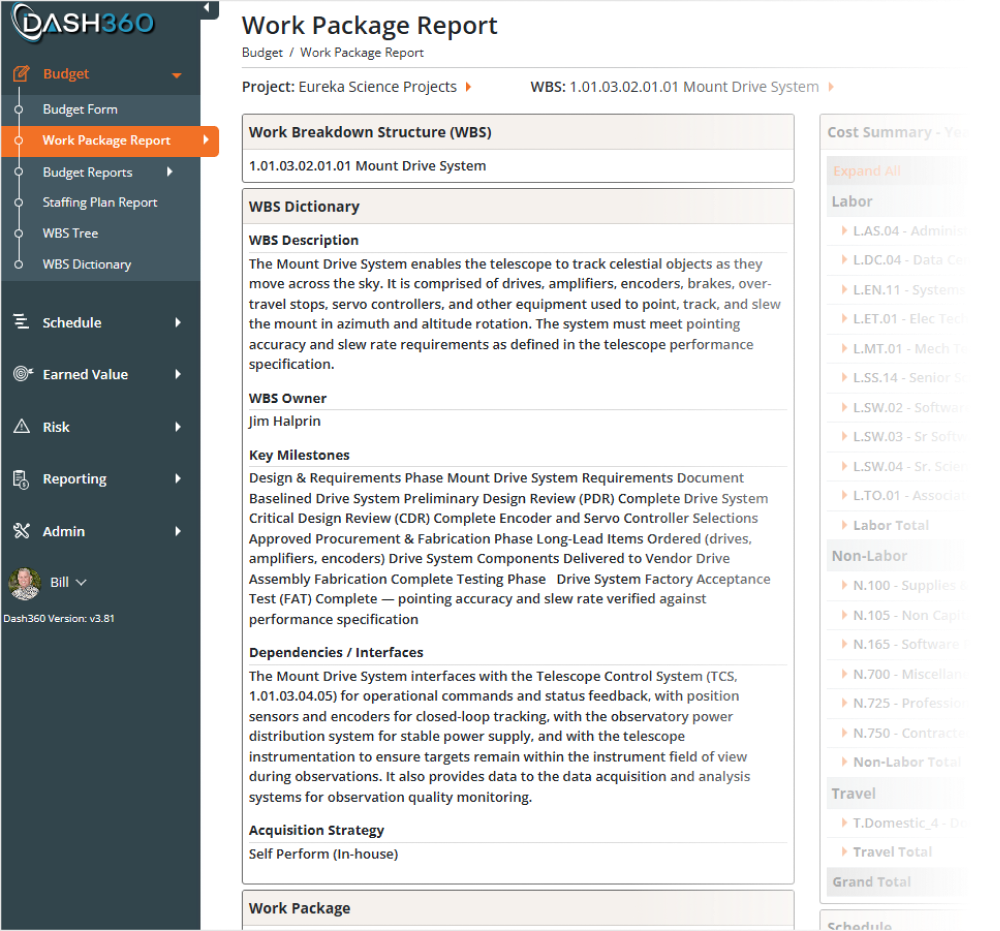
Summary and detail for each work package, all in one place.
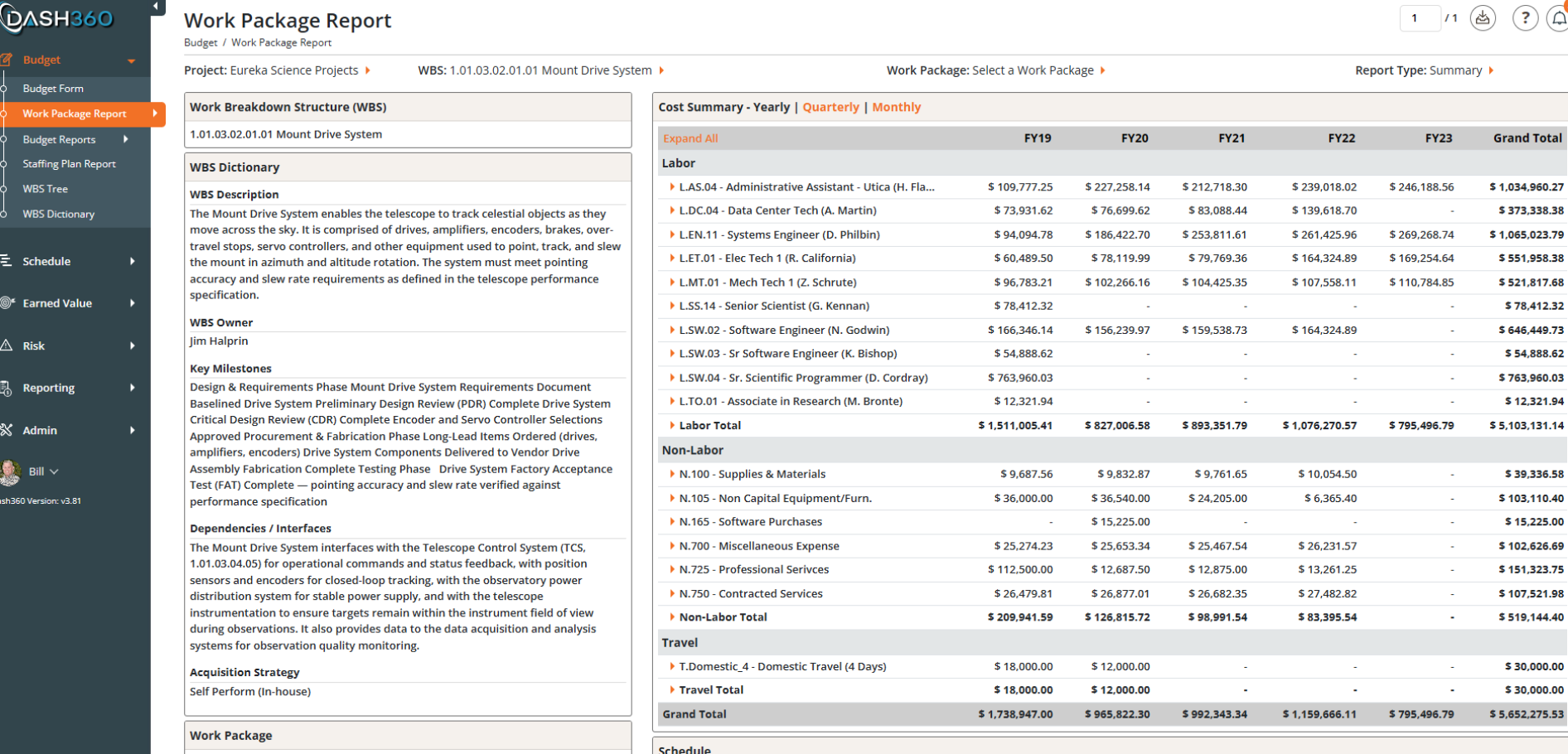
The Work Package Report provides summary information for each work package that can be expanded to detail layers, giving your team a complete, consolidated view of each work package’s full cost picture on a single screen. No navigating between screens. No piecing together data from multiple sources.
WBS context, cost summaries by labor, non-labor, and travel, time-phased budgets, schedule tasks, earned value metrics, contingency breakdowns, supporting attachments, and signature approvals are all visible together the moment you land on the page.
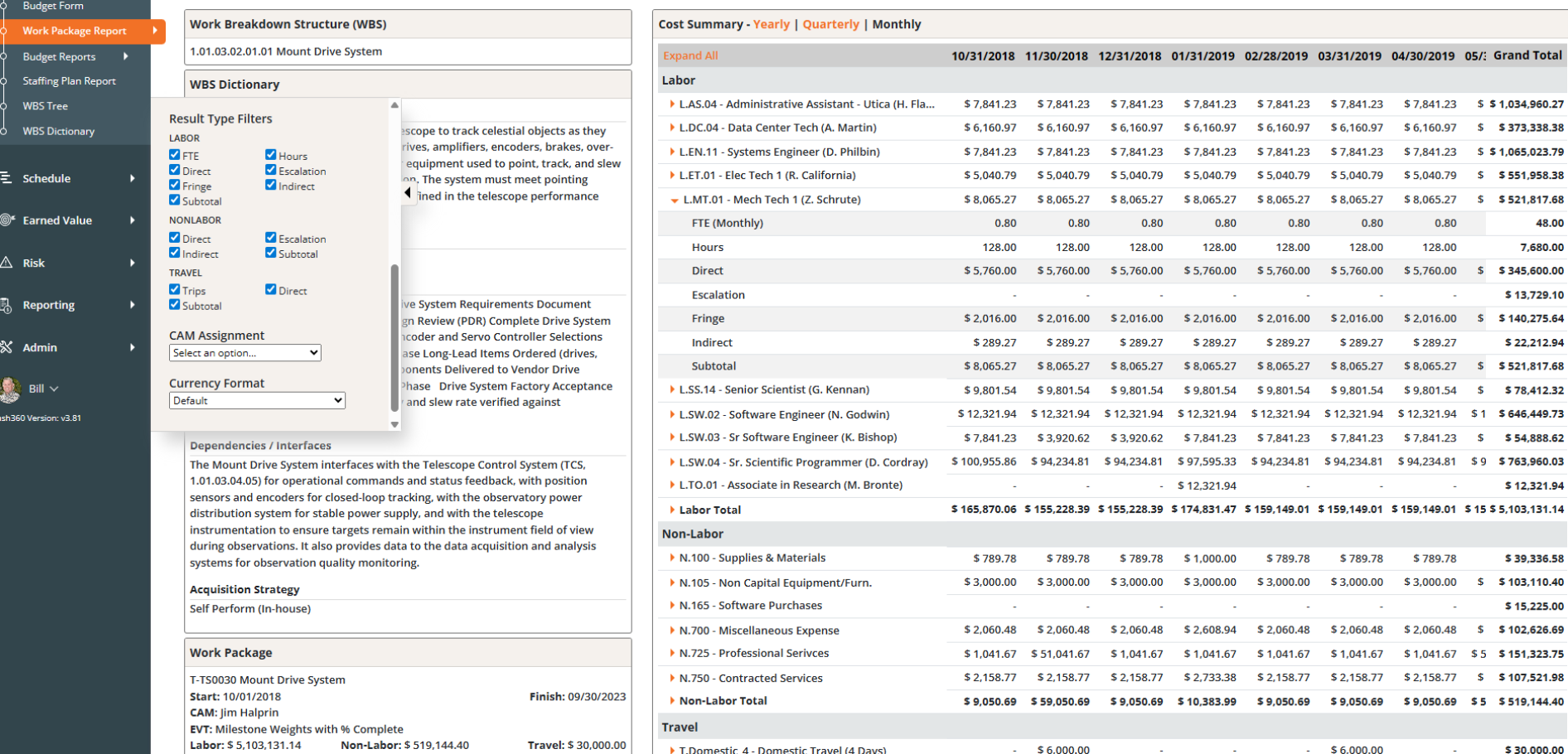
Time-phased views at every level. Easily switch between yearly, quarterly, and monthly views of your cost data instantly. Whether you are presenting to leadership or verifying a CAM’s monthly spend profile, the right level of detail is one click away.
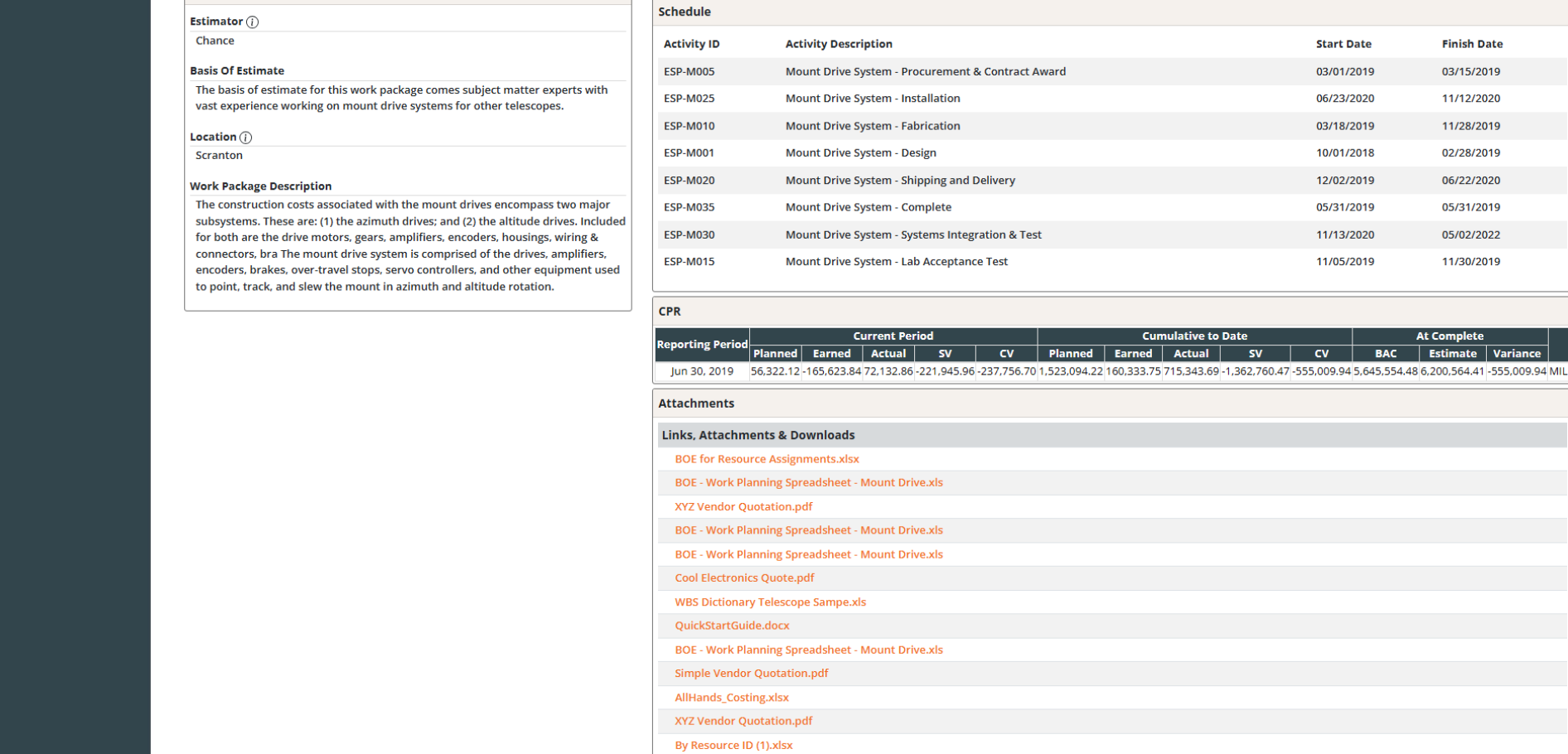
Rounding out the Work Package Report is a complete view of schedule activities, CPR performance data, user-defined fields, and all attached files and links.
Toggle between Summary and Detailed modes to match your audience. Summary mode delivers a clean, high-level cost snapshot for stakeholder reviews. Detailed mode expands into individual resource assignments with rates, hours, and costs, giving estimators and reviewers everything needed to verify the numbers line by line
Dash360’s suite of Budget Reports gives your team a complete set of pre-built reports to review, analyze, and present your cost estimate and budget at every level of the project.
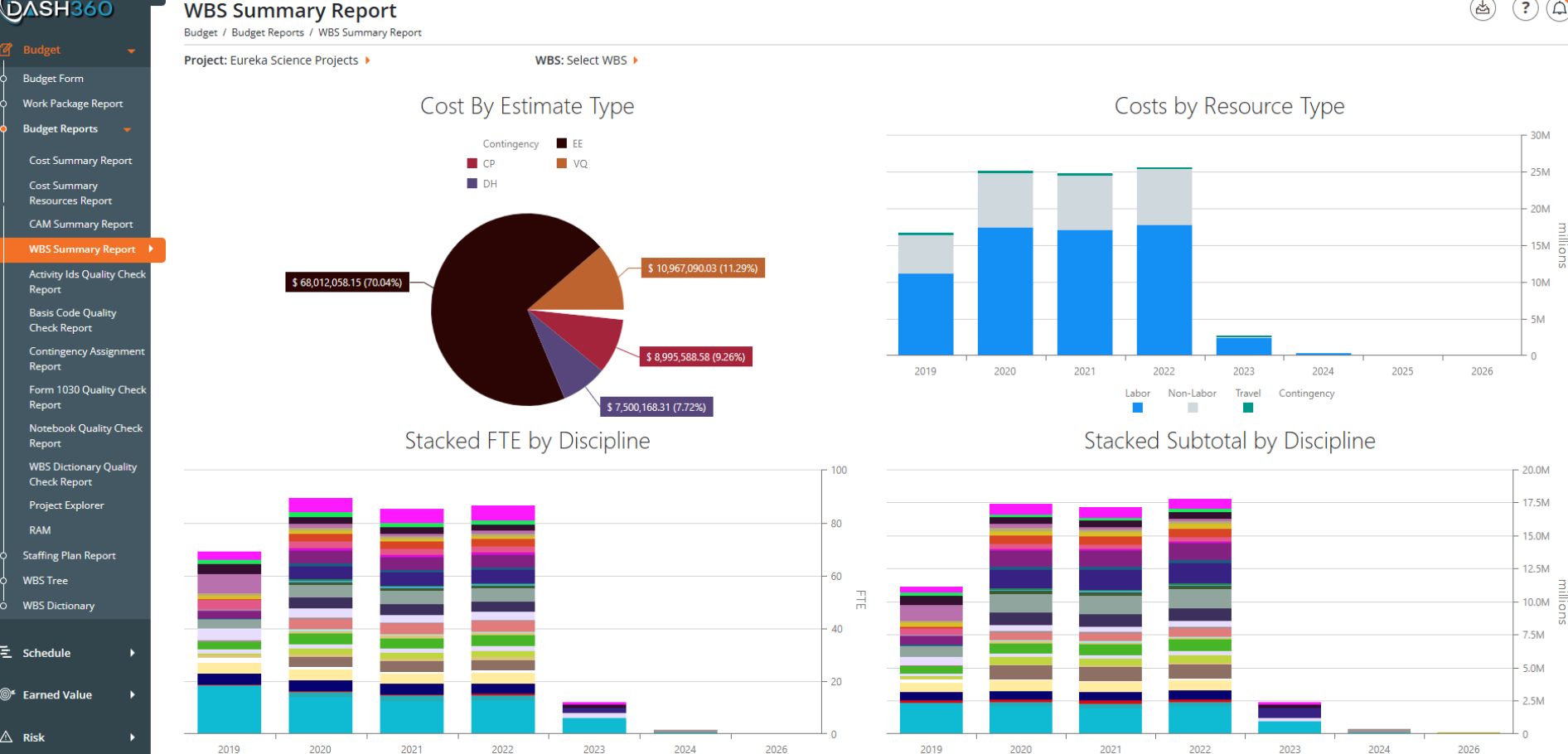
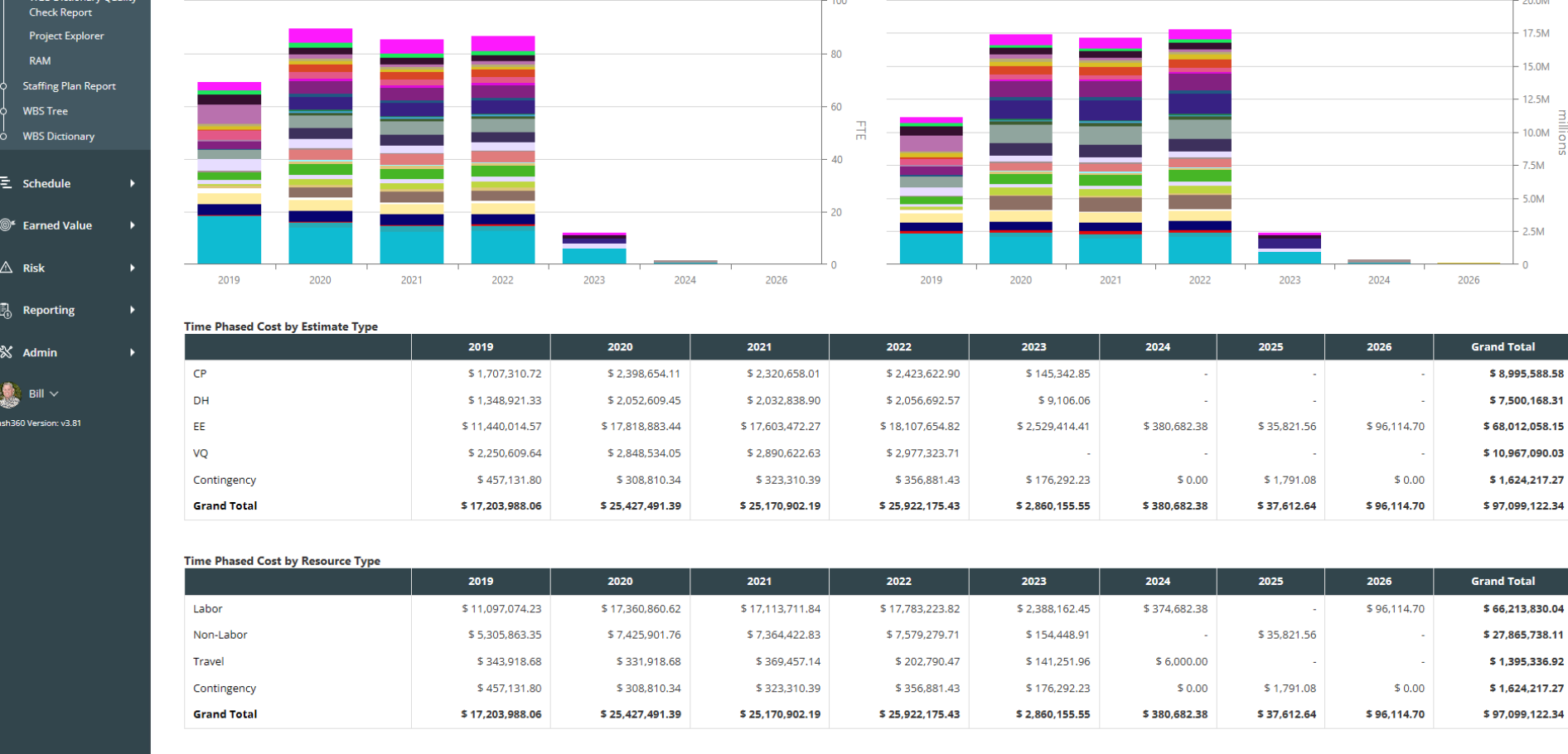
Get the full visual story of your project estimate at a glance. Cost by estimate type, costs by resource type, stacked FTE by discipline, and stacked subtotals by discipline are all presented together in a single dashboard view. Complete with a tabular view of the data and always available for a quick download to Excel.
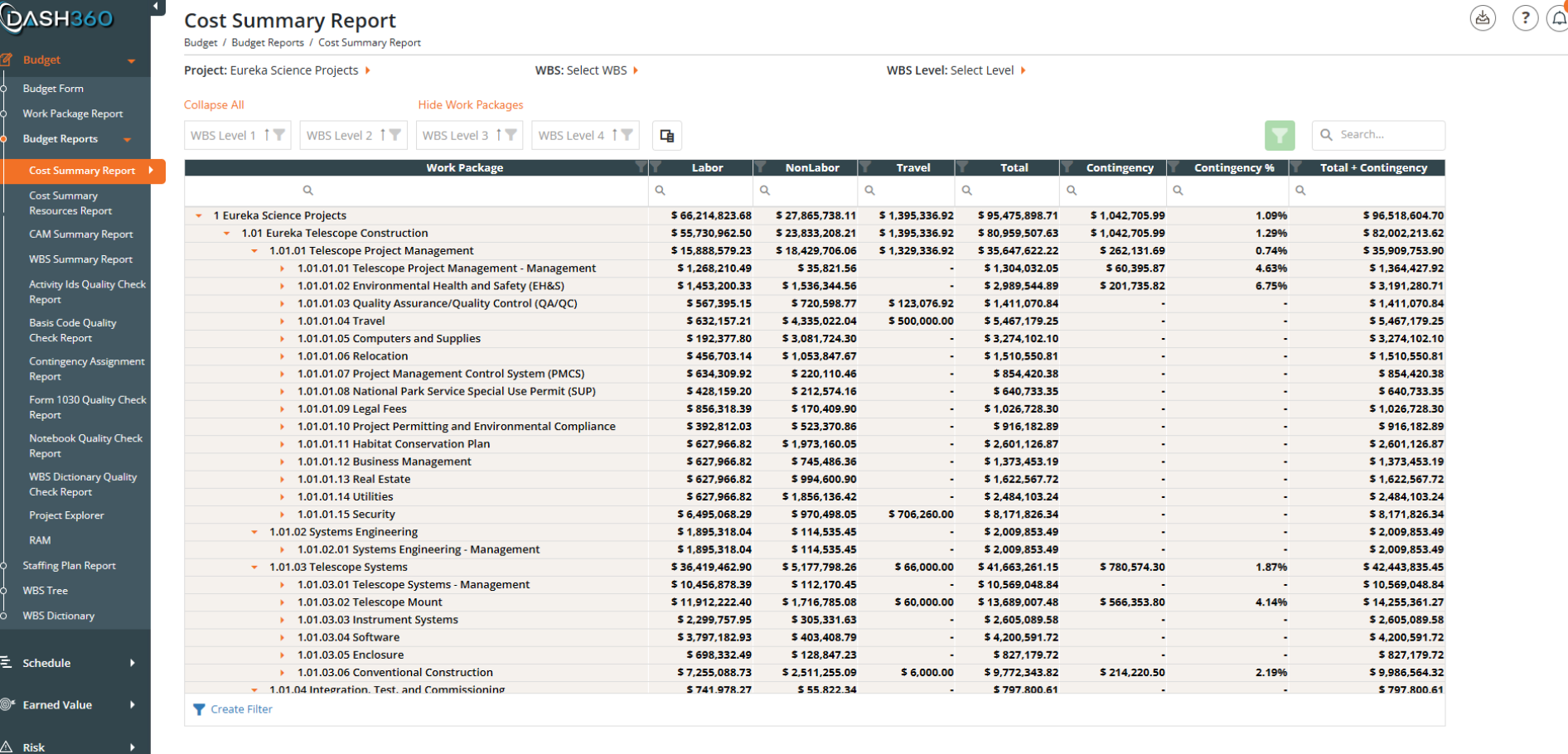
See a summary version of your entire project cost structure organized by WBS hierarchy, with every work package’s labor, non-labor, travel, contingency, and total costs rolled up and expandable at every level. Collapse to a high-level summary or drill all the way down to individual work packages. Filter by WBS level, cost class, and more, and export to Excel in one click.
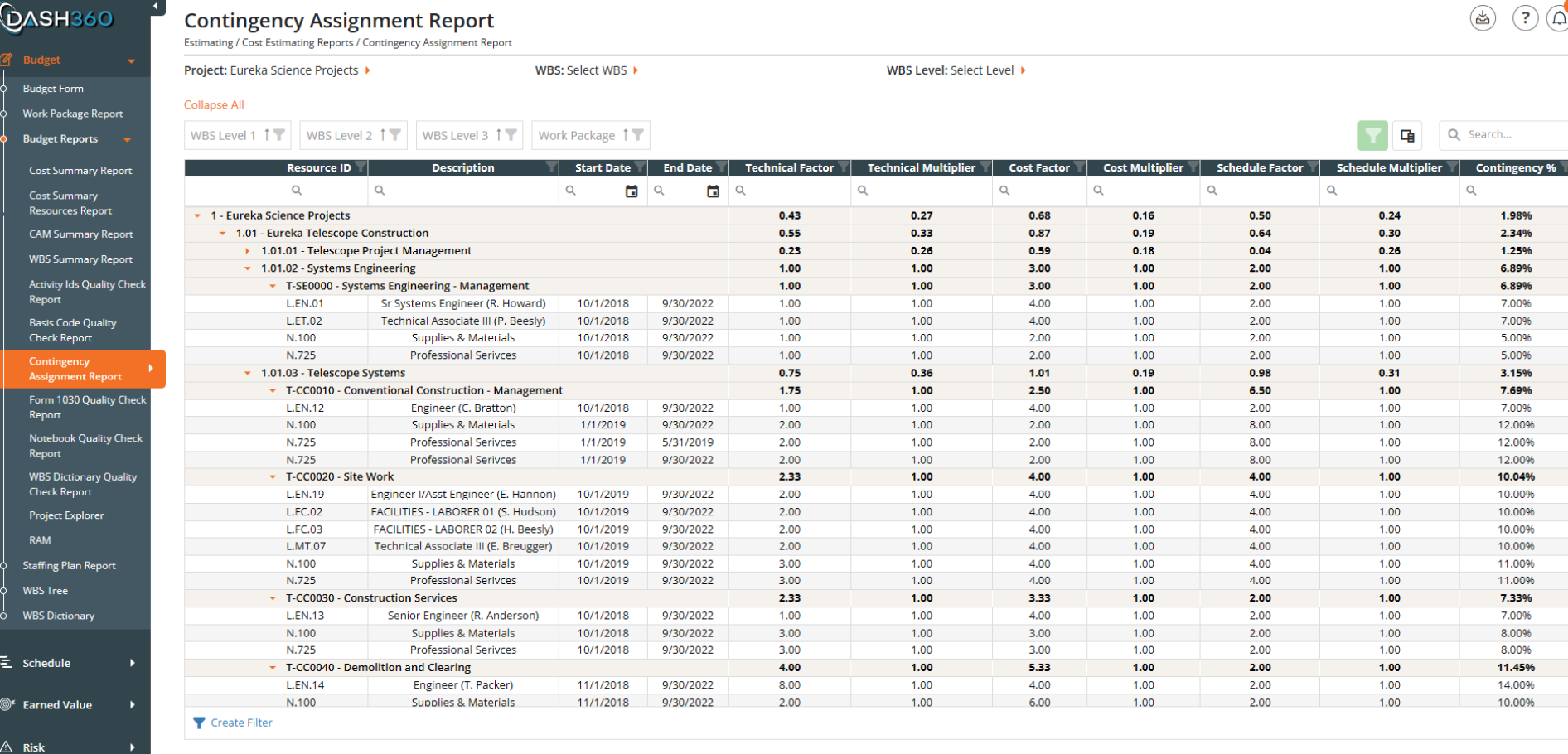
See every contingency assignment across the project, broken down by the technical, cost, and schedule risk factors that drive each percentage. Rolled up through the WBS hierarchy so you can audit contingency coverage at any level, from individual resource assignments all the way to the project total.
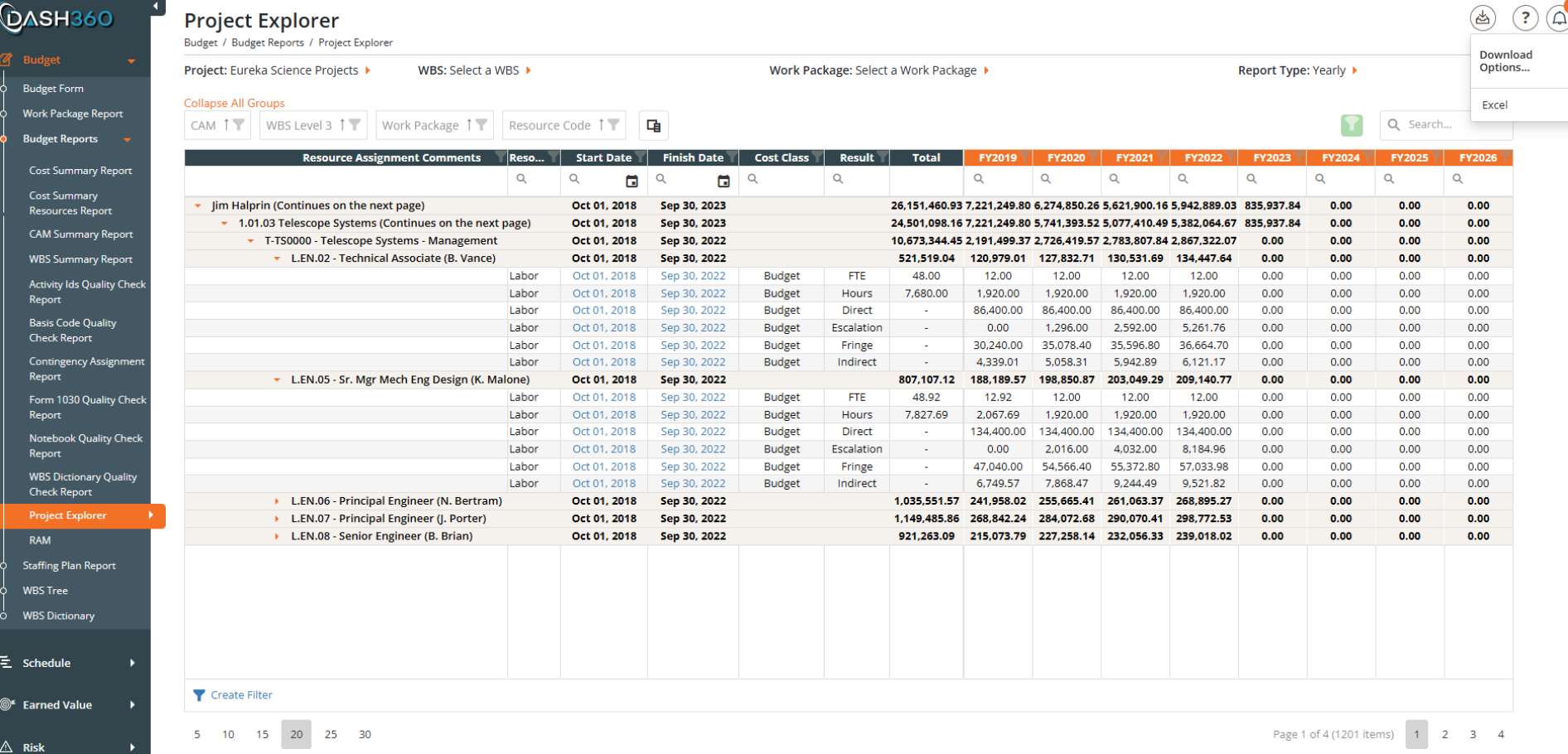
Drill into the fully burdened cost detail behind every resource assignment. FTE, hours, direct costs, escalation, fringe, and indirect charges are all broken out by resource and work package across the fiscal year timeline. When you need to understand exactly what is driving a number, the Project Explorer has the answer.
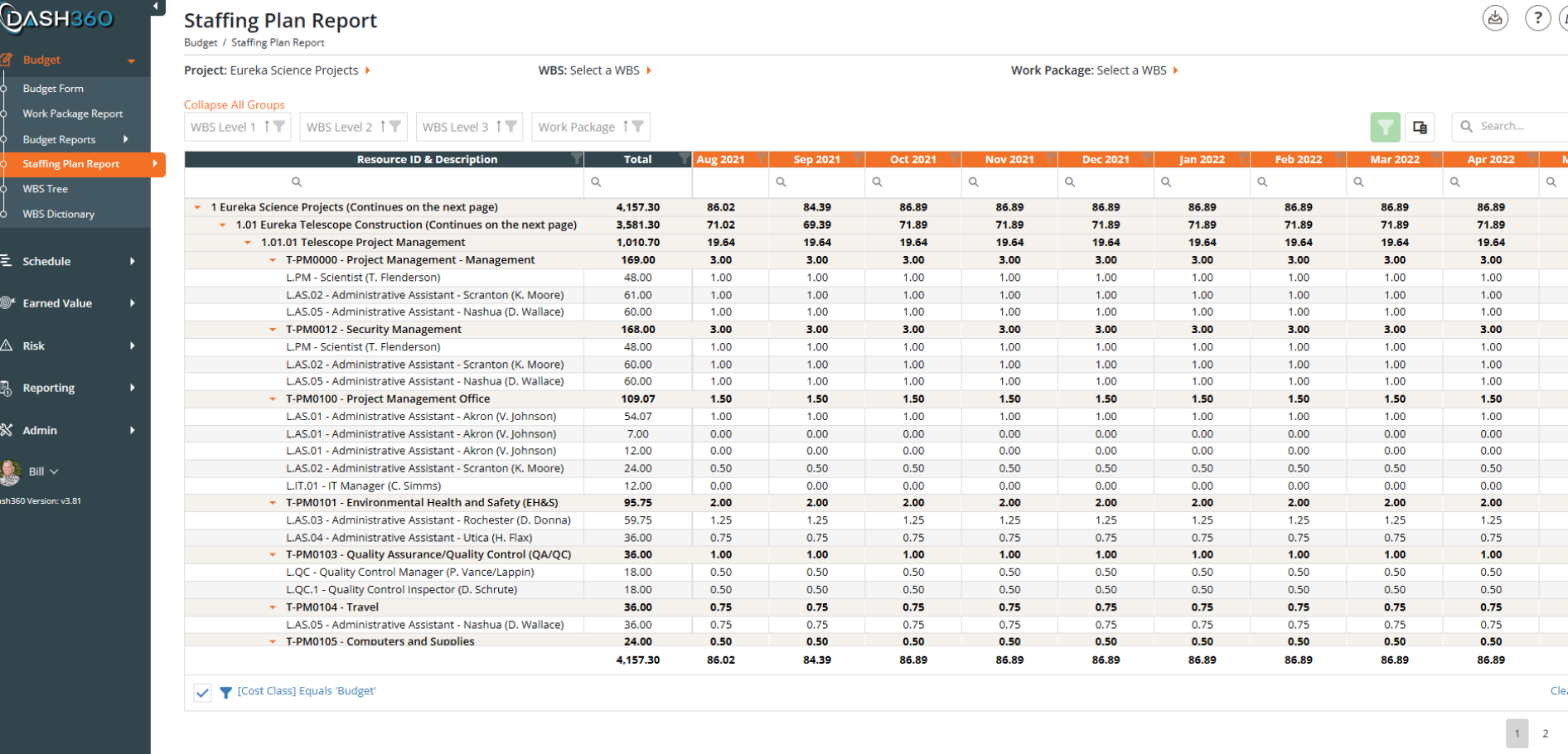
View your full FTE distribution year by year or month by month, broken out by individual resource across the project timeline. Spot over-allocations before they become problems, cross-reference your staffing plan against the schedule to make sure the two align, and share a clean, exportable workforce picture with sponsors and the Project Management Team.
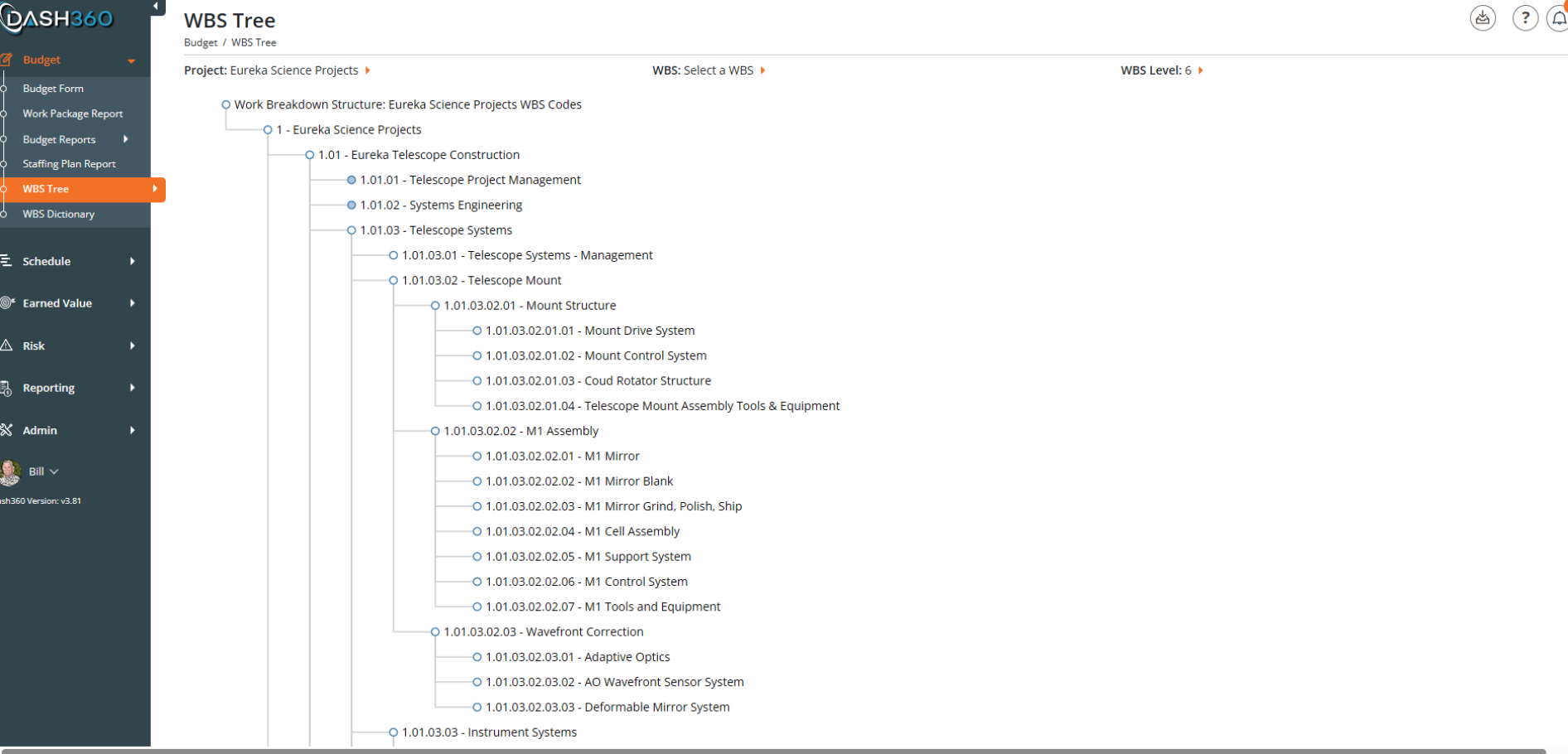
Every WBS element in your project is displayed as an expandable, collapsible visual hierarchy.
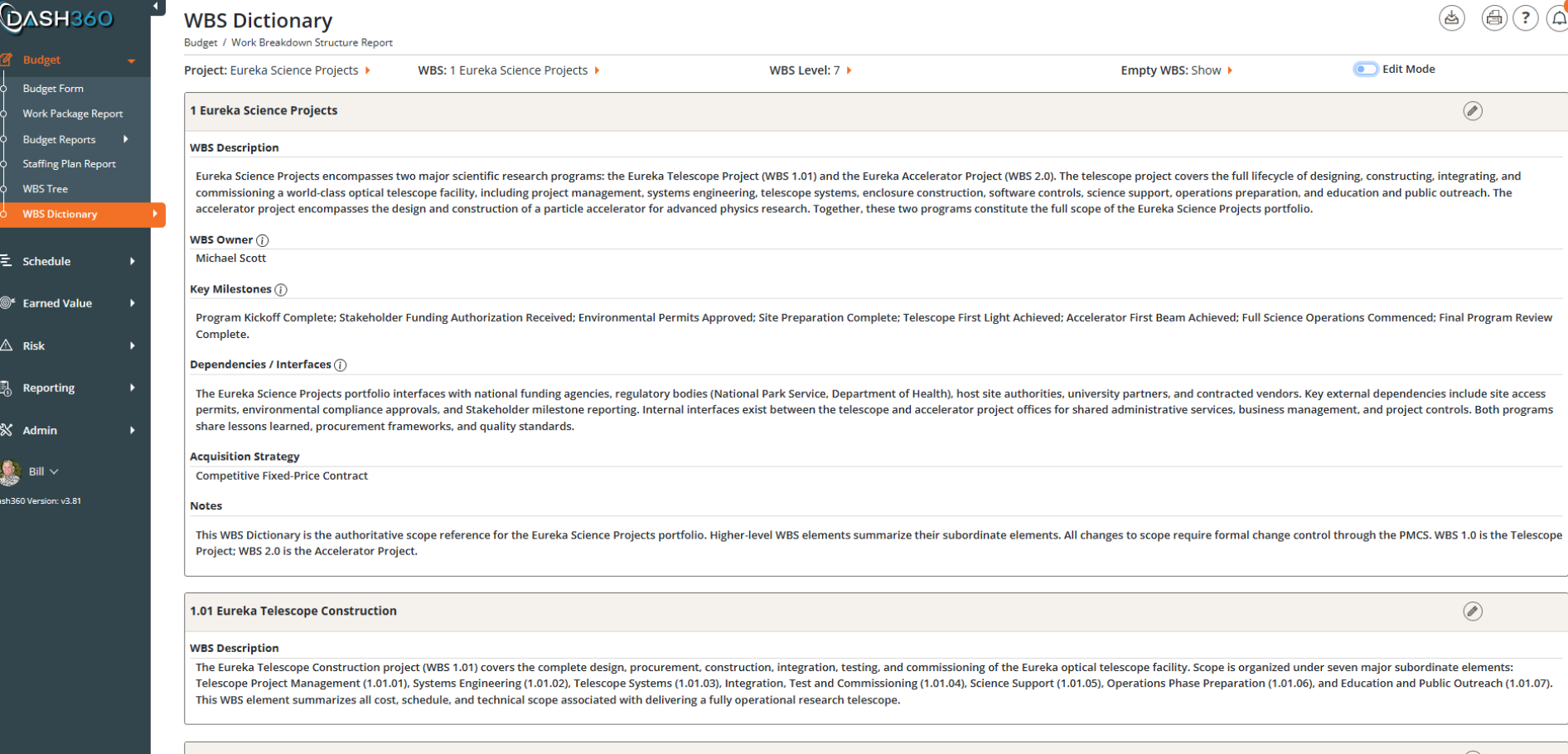
Every project needs a WBS Dictionary, and Dash360 makes collecting that data fast and painless. Using the same configurable field types available throughout the platform, including text fields, dropdowns, radio buttons, checkboxes, large text areas, and a full rich text editor, your administrator can build a WBS Dictionary form that captures exactly what your project requires. Set up in minutes, 100% flexible, and ready for your team without a separate document or spreadsheet in sight.
Copyright © 2026 Dash360 – All Rights Reserved