


Risk: Manage It Before It Manages You
Complex scientific, technology, and major construction projects exist precisely to do what has never been done before. That ambition comes with inherent risk and uncertainty baked in from day one. Risks that go untracked have a way of accumulating quietly until they aren’t quiet anymore. Projects that succeed manage risk systematically, not reactively.
Dash360’s Enterprise Risk module gives your team a complete, integrated risk management environment, from structured identification and owner accountability through heatmap visualization, mitigation planning, and native Monte Carlo analysis for both cost and schedule. Everything lives in one platform.
Key capabilities include:
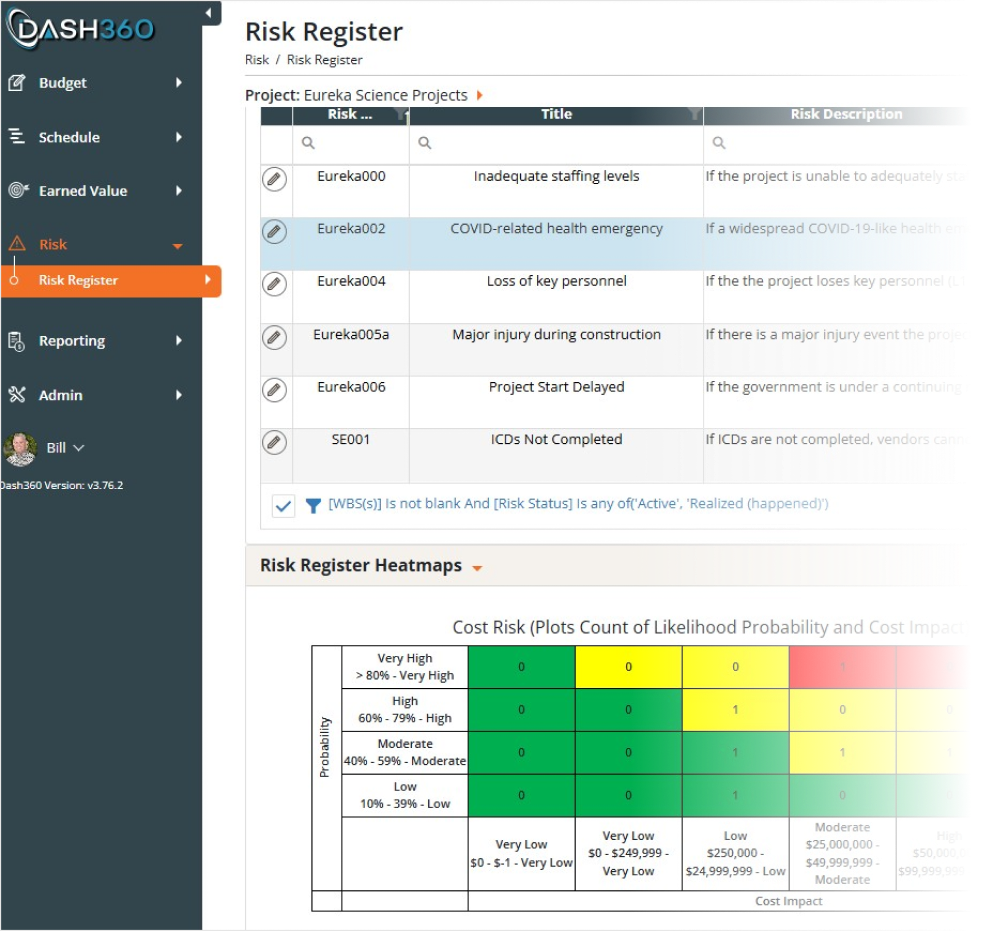
- Centralized risk register that logs every threat and opportunity with full detail, owner assignment, status tracking, and complete audit history.
- Cost, schedule, and ranking heatmaps that translate your risk inventory into color-coded severity grids so leadership instantly sees where exposure is concentrated.
- Mitigation and response planning built directly into each risk record, capturing treatment strategies, action plans, and key dates so your team is always working the risk, not just logging it.
- Native Monte Carlo simulation for cost and schedule risk, running thousands of iterations in seconds, with the ability to model multiple mitigation scenarios and compare pre- and post-response exposure side by side.
- Schedule risk analysis that quantifies finish date uncertainty across project activities, surfacing the contingency needed to meet your confidence targets.
- Key risk driver identification that surfaces the risks and activities contributing most to cost and schedule exposure, so your team knows exactly where mitigation effort will have the greatest impact.
- Configurable risk taxonomy and thresholds so the register, heatmaps, and scoring reflect your project’s structure and risk tolerance, not a generic default.
- One-click Excel download available throughout the module for reporting, sharing, or offline review.
Enterprise Risk
Risk Register: Turn Known Unknowns Into Managed, Quantified Risk.
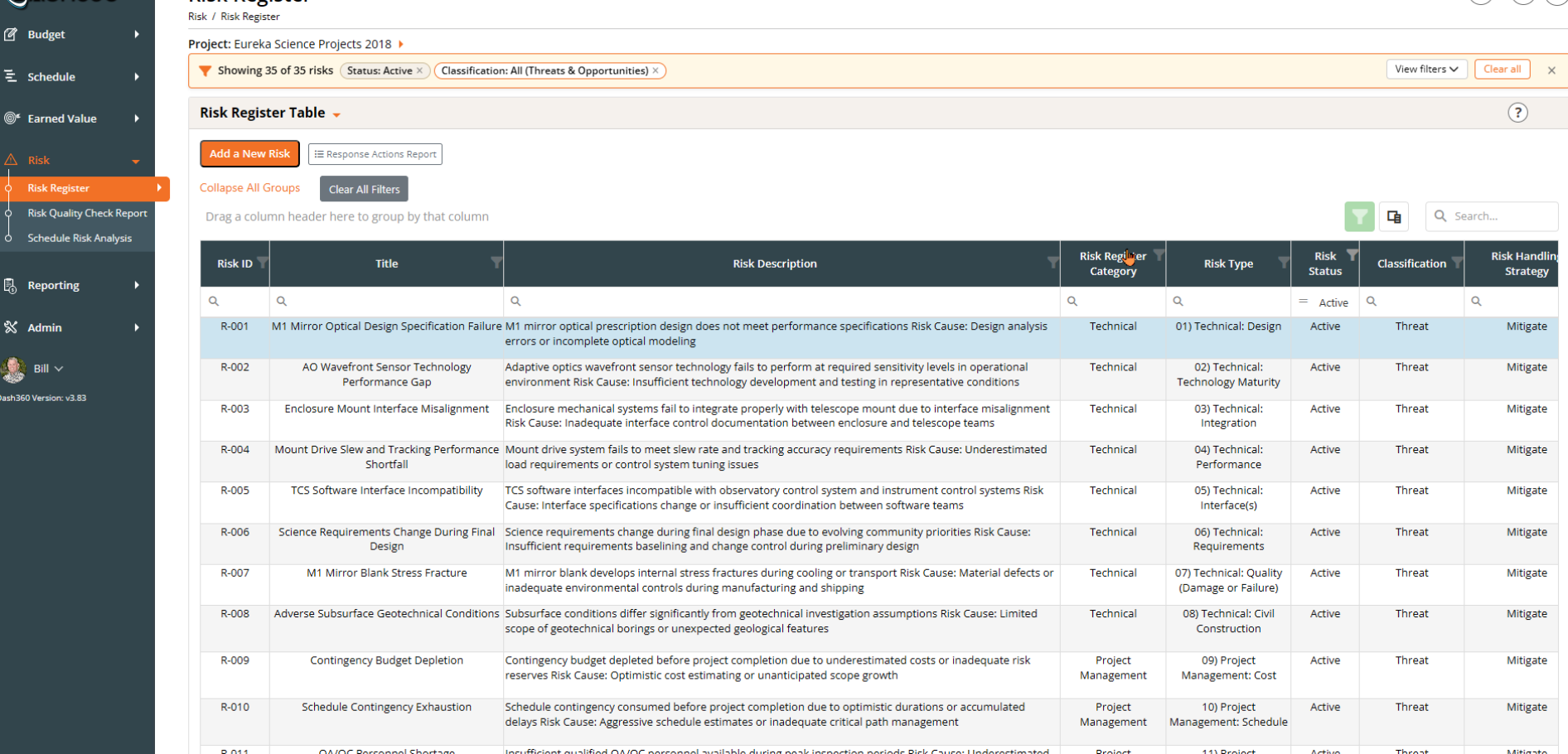
The Dash360 Risk Register gives your team a structured, centralized home for every threat and opportunity on the project. The Dash360 Risk Register goes beyond logging risks. Your team defines the appropriate response strategy for each risk, whether that is mitigate, transfer, accept, or avoid, then runs native Monte Carlo simulations to compare pre- and post-response cost exposure side by side. You don’t just manage risk, you quantify the value of managing it well.
- Structured risk logging. Capture risk ID, title, description, category, type, cost and schedule impact, and handling strategy in a consistent, fully customizable format across the team.
- Owner accountability built in. Assign a named risk owner and action owners so every risk has a responsible party, not just a record.
- Status visibility at a glance. Track whether each risk is proposed, active, realized, retired, or deprecated so your register always reflects the current state of the project.
- Full mitigation planning included. Capture treatment strategies, action plans, risk distribution, and key dates directly alongside each risk record.
Risk Detail: The Full Story Behind Every Risk
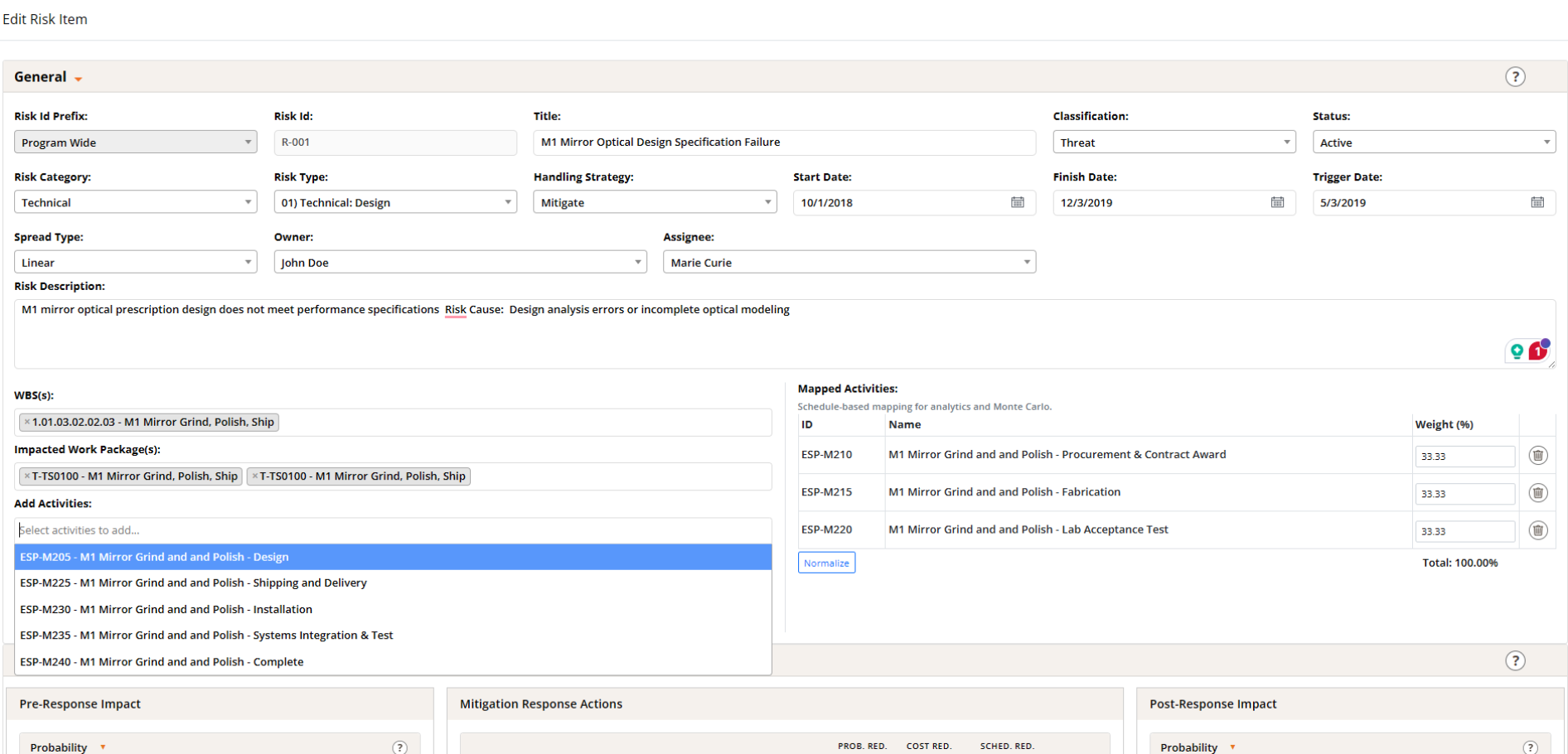
Each risk record captures everything your team needs to assess, assign, and act, from classification and handling strategy through WBS and schedule activity mapping. Pre- and post-response impact panels sit alongside mitigation actions so the full picture of a risk and its response lives in one place.
- Complete risk identification. Log category, type, classification, status, handling strategy, trigger date, and a full description in a structured, consistent format.
- Owner and assignee accountability. Assign both a risk owner and an action assignee so responsibility is never ambiguous.
- WBS and schedule activity mapping. Link each risk directly to impacted work packages and schedule activities, with weighted percentages that feed Monte Carlo simulations automatically.
Risk Impact: Before and After. The True Impact of Your Mitigation Response
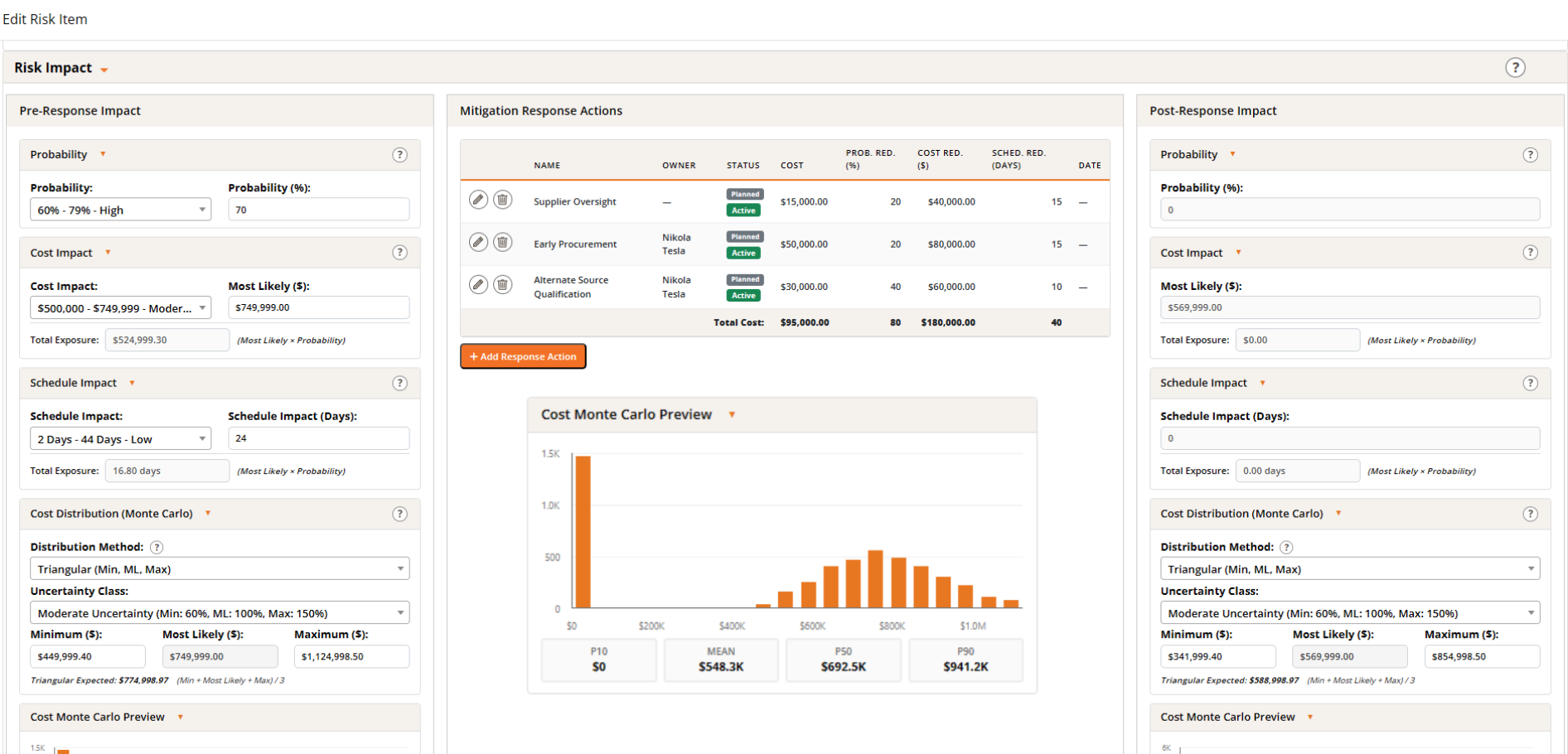
The Risk Impact panel captures the full quantitative story of every risk, from initial probability and cost and schedule exposure through mitigation actions and their measurable reductions. A Monte Carlo preview for the individual risk updates as responses are added so your team always sees the true before and after impact of their mitigation work in real time.
- Pre- and post-response impact side by side. Probability, cost exposure, and schedule impact are calculated before and after mitigation actions so the difference your response makes is immediately visible.
- Mitigation actions with tracked reductions. Each response action captures cost, probability reduction, cost reduction, and schedule reduction so the cumulative effect of your mitigation plan is fully quantified.
- Configurable cost distributions. Set distribution method and uncertainty class per risk, with min, most likely, and max values driving the individual risk Monte Carlo preview.
- Per-risk Monte Carlo preview. See the cost distribution and key percentiles for this risk in isolation, before it rolls up into the full project-level simulation.
A Clean, Organized Workspace
The Budget Form is organized into collapsible accordion sections so your workspace stays focused. Details, WBS Dictionary, Resource Assignments, Schedule, CPR, Risk Factors, Potential Risks, Supporting Documents, Comments, and Signature Approvals can freeze the entries so they can be approved and no changes can be made.
Resource Assignment by Labor, Non-Labor, and Travel
Capture every cost type with a clean, intuitive interface built for speed. Select a resource, set a start and finish date, and you are ready to build.
Built for the Way Your Organization Works
No two projects are alike, and no two organizations track costs exactly the same way. Dash360 is built with that reality in mind. The Budget Form’s Details section is 100% configurable by your administrator.
Built-In Excel-Like Profiles
Distribute costs directly in a familiar grid interface. Use the linear spread function to allocate costs evenly month over month in one click, or assign specific values to any month to build a profile that reflects how work actually happens.
Enter Data Your Way
Whether your team prefers to work directly in the Dash360 interface or bring data in from Excel, the Budget Form supports both. The intuitive entry interface is fast and approachable for any user, and robust Excel import tools mean spreadsheet-based estimates move into the system cleanly, without manual re-entry or reconciliation.
Fully Burdened Cost Calculations
All resource rates and fully burdened cost calculations are configured in Dash360’s Admin area and are 100% customizable, so the numbers your team works with always reflect your organization’s actual cost structure.
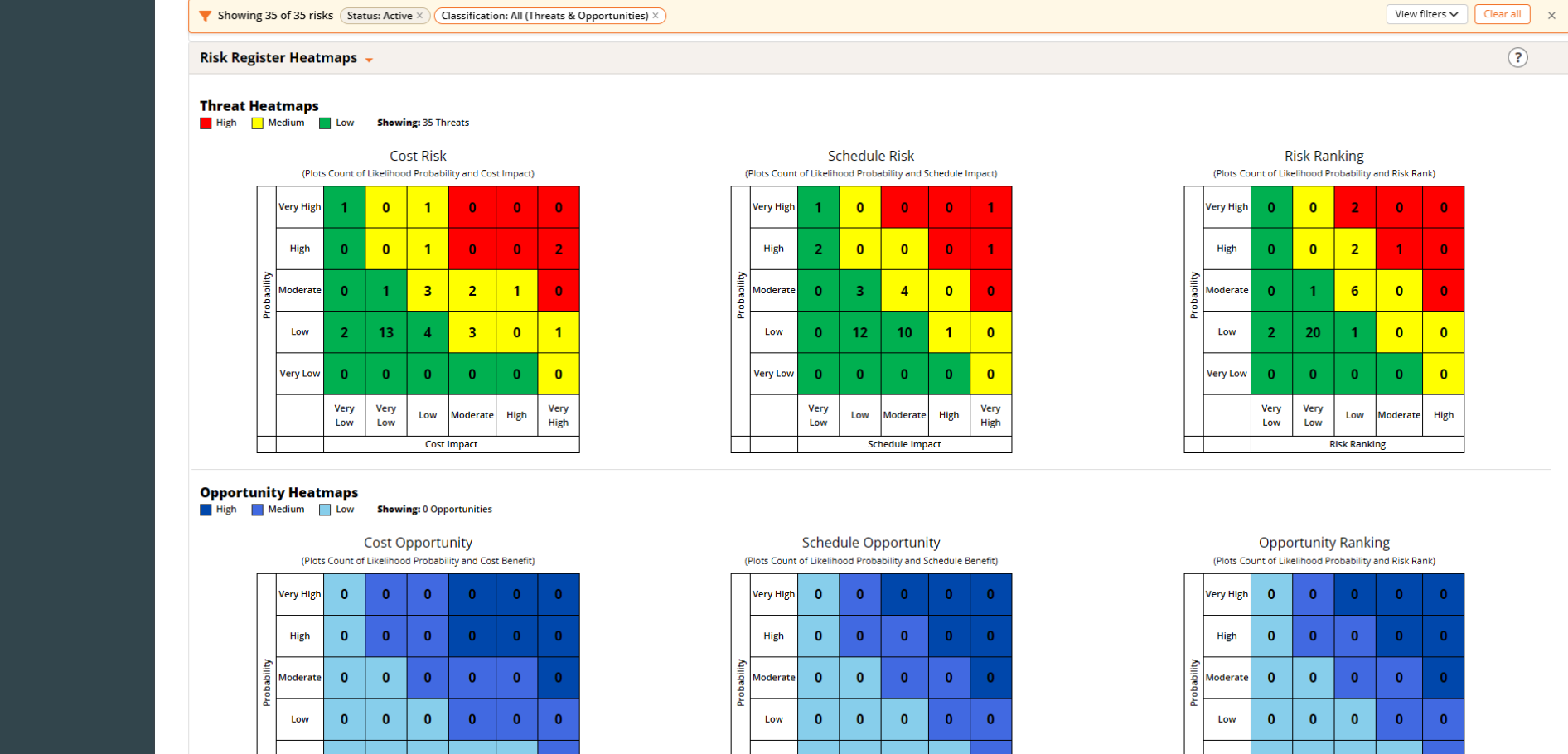
Risk Heatmaps: Your Complete Threat and Opportunity Picture at a Glance
The Risk Register Heatmaps translate your entire risk inventory into color-coded severity grids across Cost, Schedule, and Risk Ranking, for both threats and opportunities. Leadership gets an immediate read on where exposure is concentrated and where the project has potential upside, without combing through rows of data.
- Separate threat and opportunity heatmaps. Threats plot in red, yellow, and green by severity. Opportunities display in a separate blue-coded grid so upside potential is visible alongside downside risk.
- Three views per classification. Cost, Schedule, and Risk Ranking grids display simultaneously, each plotting likelihood against impact so the full exposure picture is visible in a single screen.
- Instant prioritization. Red cells flag the high-probability, high-impact risks that need immediate attention in every review meeting.
- Click to filter. Clicking any heatmap cell instantly filters the risk register to just those risks and drives all downstream reports from that selection, so your review meeting can go from the big picture to the specific risks in a single click.
- Project-defined thresholds. Every project configures its own probability and impact ranges so the heatmap calibration reflects your project’s specific risk tolerance and scoring criteria, not a generic default.
Everything That Matters, On One Screen
WBS context, cost summaries by labor, non-labor, and travel, time-phased budgets, schedule tasks, earned value metrics, contingency breakdowns, supporting attachments, and signature approvals are all visible together the moment you land on the page.
Time-Phased Views
Time-Phased Views at Every Level Switch between yearly, quarterly, and monthly views of your cost data instantly. Whether you are presenting to leadership or verifying a CAM’s monthly spend profile, the right level of detail is one click away.
Summary and Detailed Mode
Toggle between Summary and Detailed modes to match your audience. Summary mode delivers a clean, high-level cost snapshot for stakeholder reviews. Detailed mode expands into individual resource assignments with rates, hours, and costs, giving estimators and reviewers everything needed to verify the numbers line by line
Monte Carlo Simulation: The Process Is the Value. The Number Is the Proof.
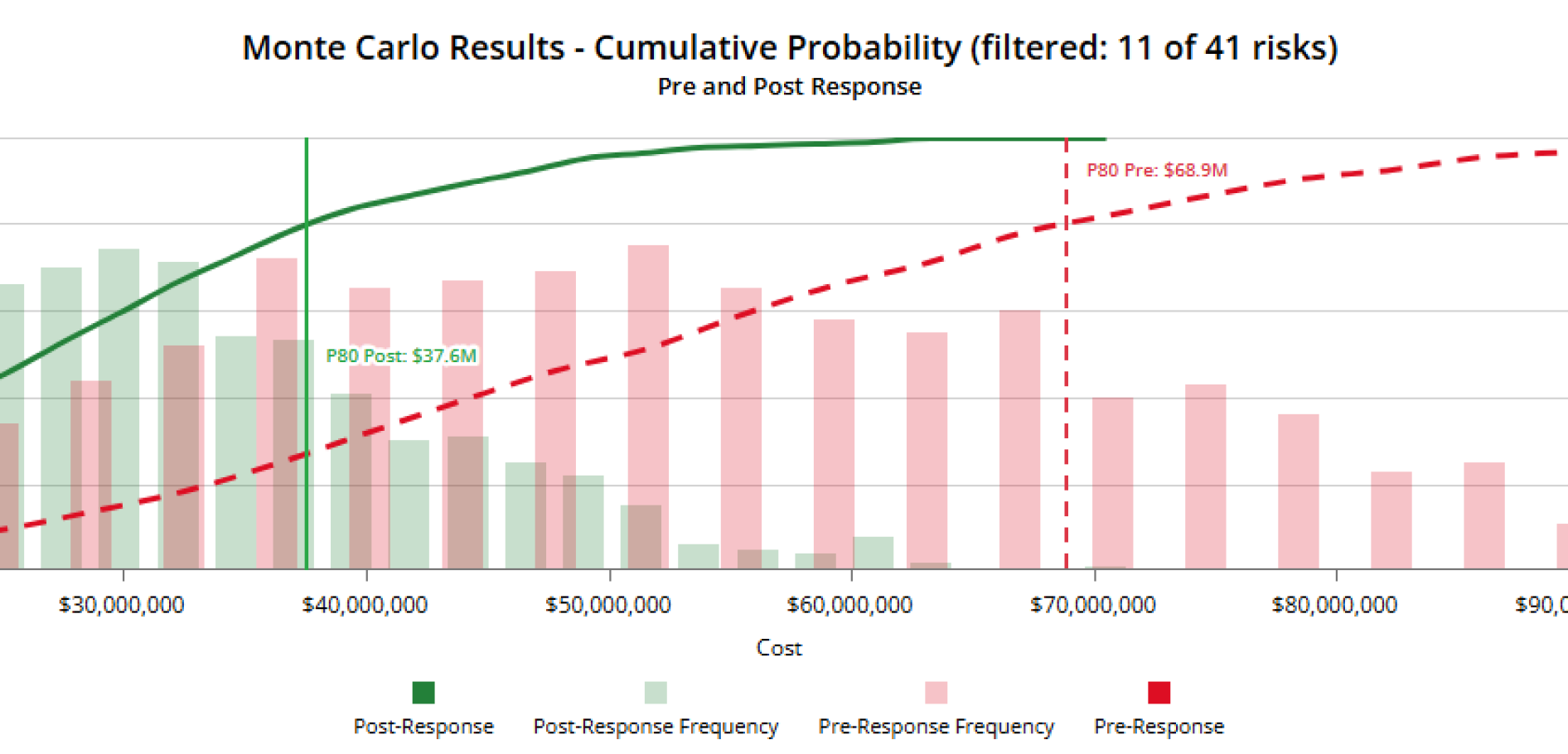
Dash360’s native Monte Carlo engine aggregates every risk in your register and simulates total project cost and schedule exposure across thousands of iterations, no third-party tools required. The real value is in the discipline of thinking through every risk scenario and its response. The simulation result gives you a key data point you can point to when making the case for your contingency estimate.
- Project-level cost and schedule simulation in seconds. Set the number of iterations, choose a scenario, and run. Results return immediately as a full frequency distribution and cumulative probability curve.
- Pre- and post-response comparison in one chart. See unmitigated and mitigated exposure plotted side by side so the impact of your mitigation plan is visible at every confidence level.
- A contingency data point grounded in your risks. Percentile summary tables show pre-response, post-response, reduction, and percent improvement, giving your team a simulation-backed reference point for cost and schedule contingency decisions.
- Saved simulation history. Previous simulations are stored and available for comparison so your team can track how risk exposure has changed over time as mitigations are implemented.
- Scenario modeling. Run simulations against different mitigation scenarios to compare approaches and identify the response strategy with the greatest impact on exposure.
Run the scenarios. Arrive at a number you can stand behind.
Sensitivity and Delta Analysis: See What's Driving Exposure
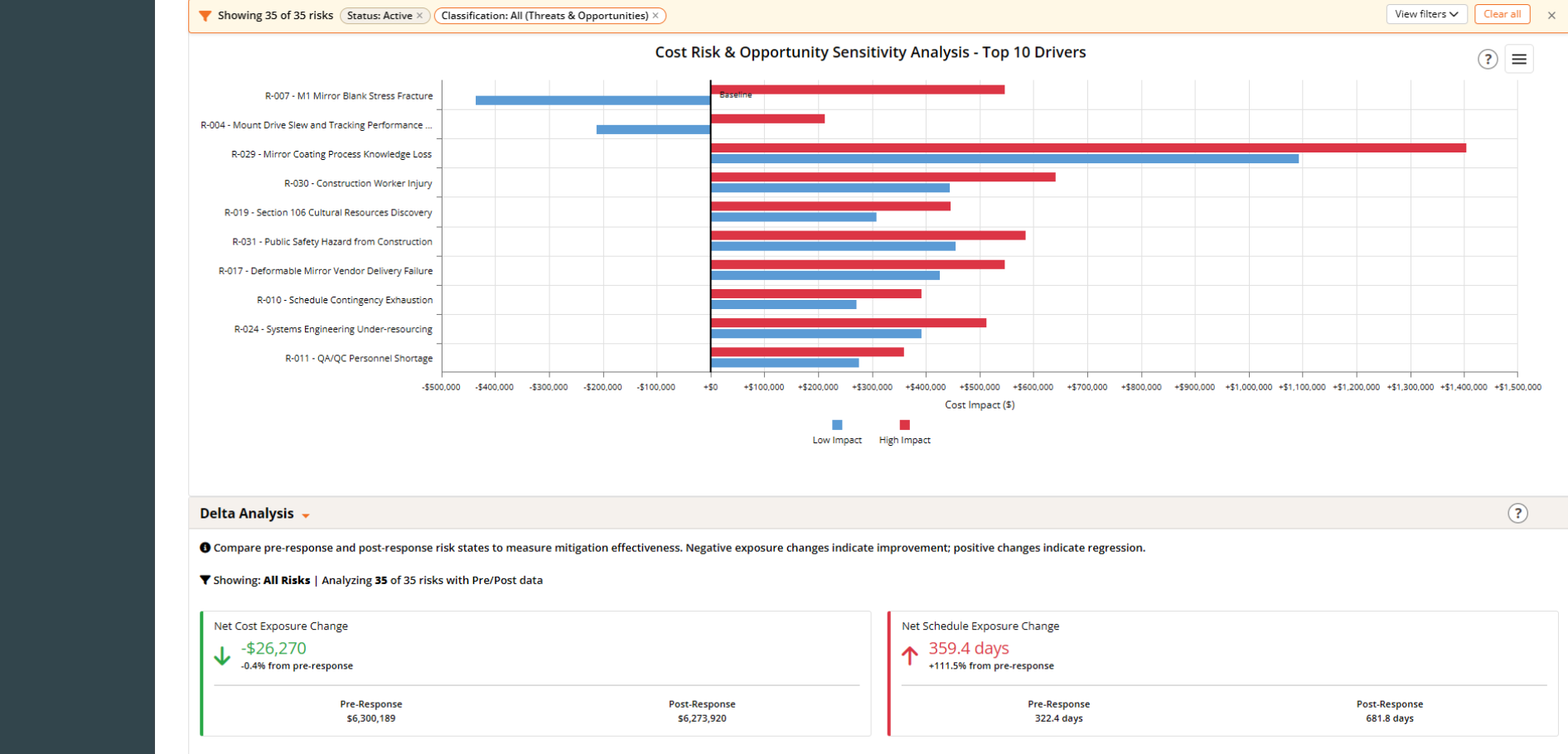
The sensitivity tornado chart ranks your top cost risk drivers by their high and low impact range, so your team immediately knows which risks have the most leverage on total project cost. The Delta Analysis panel then measures whether your mitigation responses are actually moving the needle, comparing net cost and schedule exposure before and after response across the entire risk register.
- Tornado chart of top risk drivers. Ranks the top 10 risks by cost impact range, plotting both low and high impact scenarios so the risks with the greatest influence on total exposure are immediately identifiable.
- Pre- and post-response delta for cost and schedule. Net cost exposure change and net schedule exposure change are calculated across all risks, with pre- and post-response values displayed side by side so mitigation effectiveness is measured, not assumed.
- Positive and negative signals. Negative exposure changes confirm mitigations are working. Positive changes flag areas where responses may need to be revisited.
Monte Carlo by WBS: The Detail and the Rollup. All in One View.
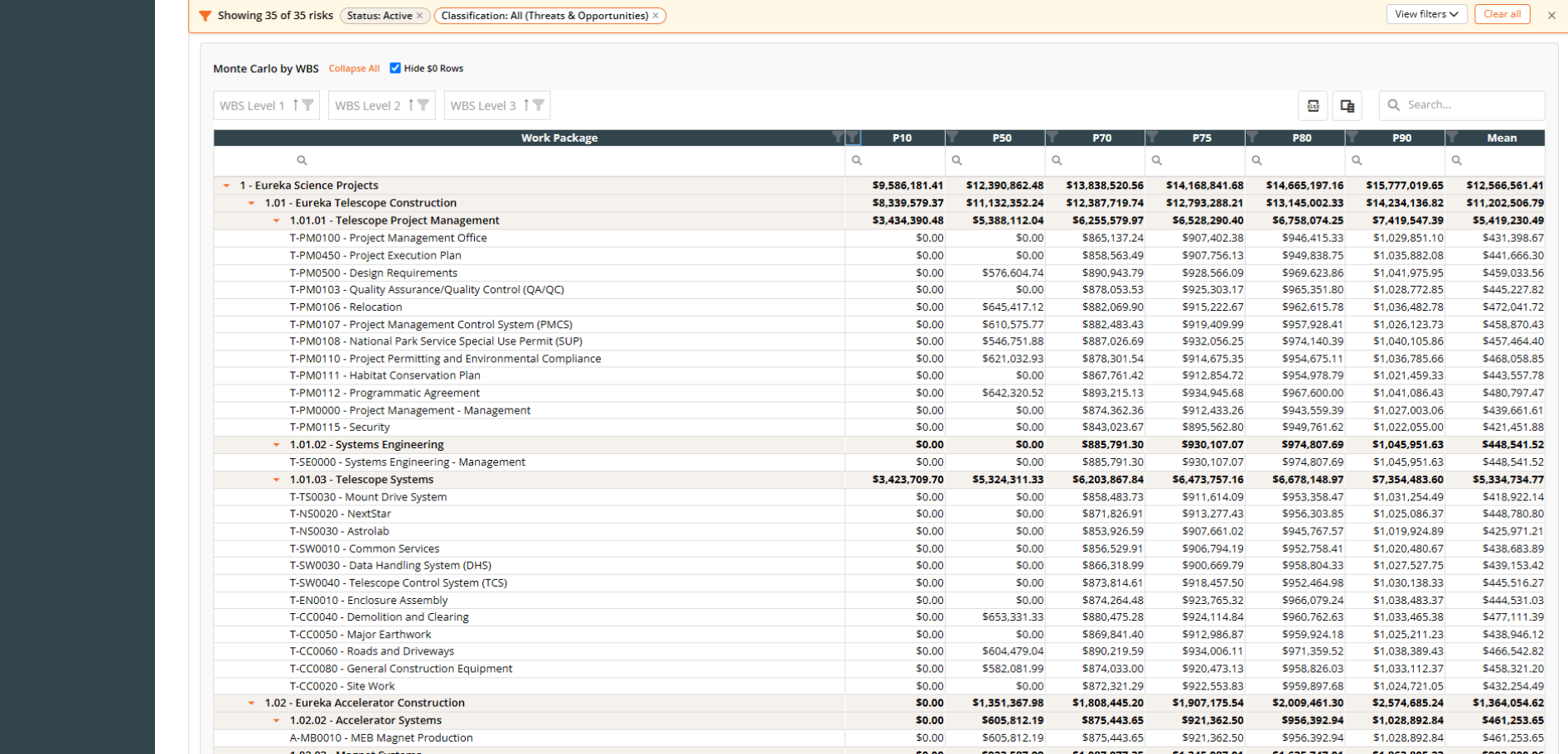
The Monte Carlo by WBS table breaks simulation results down to the work package level and rolls them up through every level of the WBS automatically. No manual aggregation, no disconnected summaries, and no confusion about where the numbers come from.
- Full WBS hierarchy with automatic rollup. Parent rows aggregate their children at every WBS level so the relationship between work package exposure and total project exposure is always clear and always correct.
- Multiple percentile columns side by side. View P10, P50, P70, P75, P80, P90, and Mean in a single table so your team can read confidence levels across the full range without switching views.
- WBS level filtering. Collapse or expand to any level of the hierarchy and filter by WBS level to focus on the summary or the detail your audience needs.
- Excel download available. Pull the full table into Excel for reporting, stakeholder packages, or offline review with one click.
The rollup other tools can’t deliver
Risk Drivers: See the Trends. Find the Sources. Focus the Response.
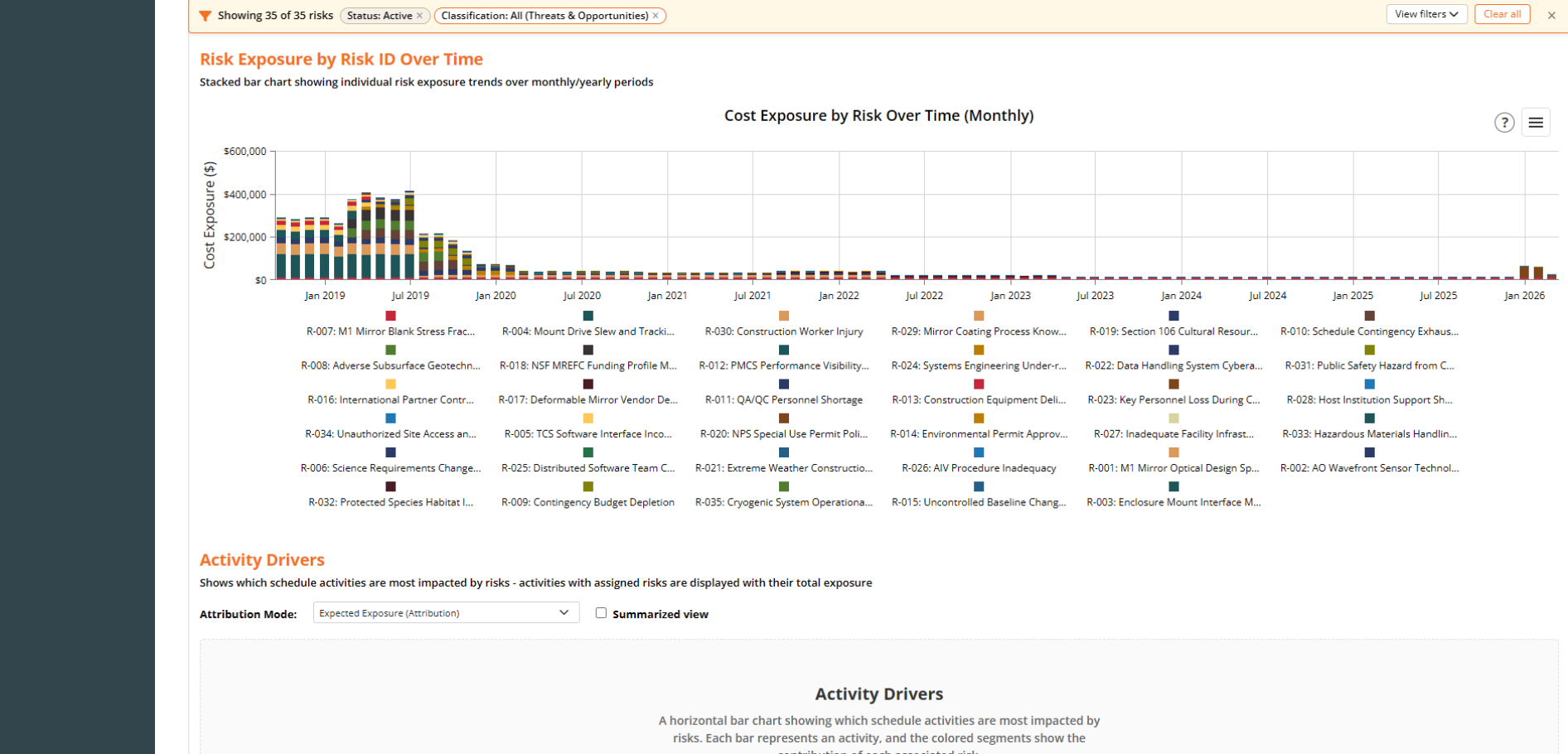
Understanding total risk exposure is only half the story. Dash360 shows you how that exposure has trended over time by individual risk, and which schedule activities are carrying the most risk weight, so your team knows exactly where to focus mitigation effort for the greatest impact.
- Cost exposure by risk over time. A stacked bar chart plots each risk’s individual cost exposure monthly, so your team can see which risks are driving the most exposure and how that picture has changed across the project lifecycle.
- Activity drivers analysis. Identifies which schedule activities carry the highest total risk exposure, with each bar broken down by the contributing risks, so the connection between schedule work and risk impact is always visible.
- From total exposure to root cause. Move from the project-level Monte Carlo number down to the specific risks and activities behind it, giving your team a clear line of sight from the contingency estimate to what is actually driving it.
Know your drivers. Target your response.
Exposure Comparison and Burndown
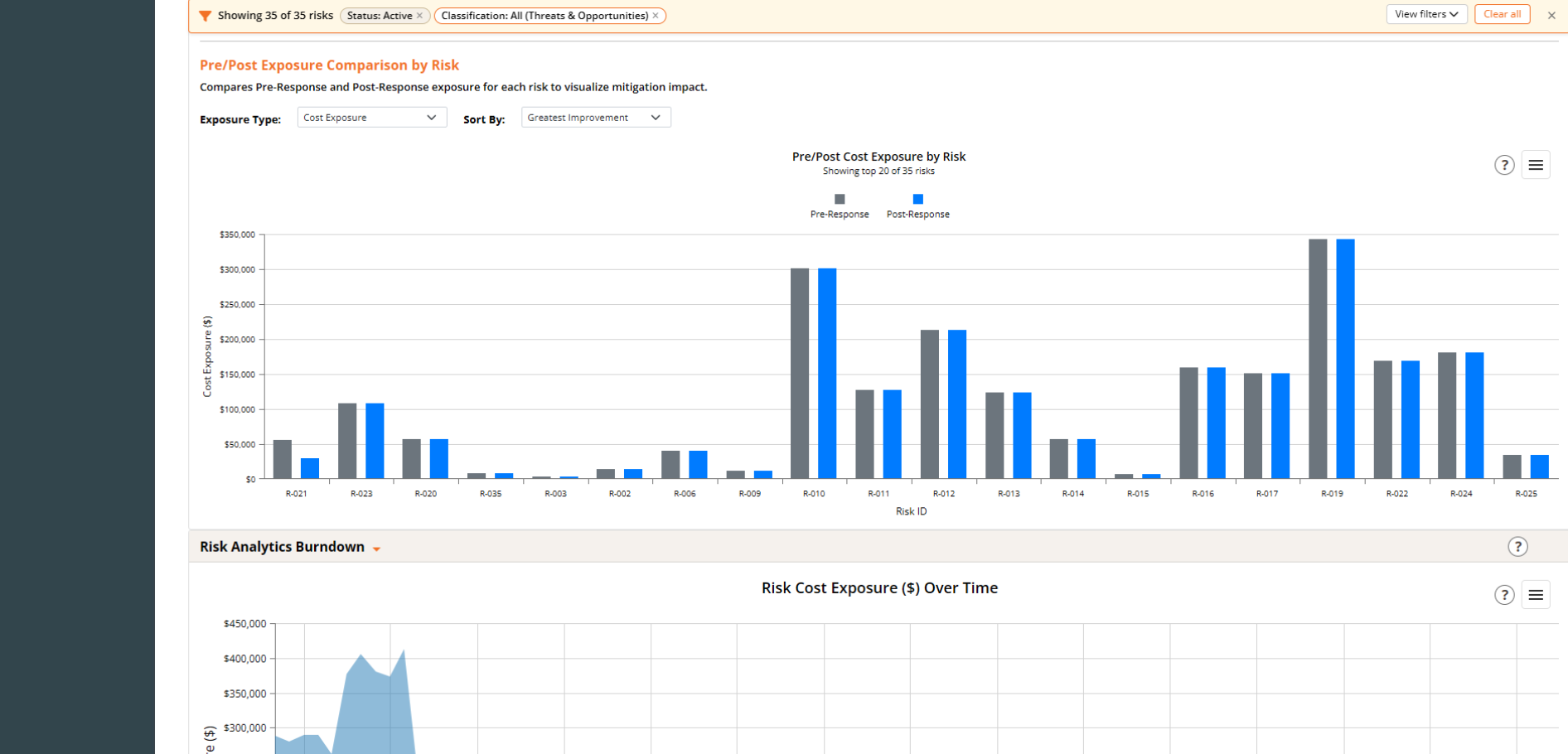
The Pre/Post Exposure Comparison shows the cost exposure impact of mitigation responses at the individual risk level, while the Risk Analytics Burndown tracks how total project risk exposure has trended over time. Together they give your team a complete picture of whether the mitigation program is working and where it still needs attention.
- Pre- and post-response comparison by risk. You define the colors of the bars in the plot each risk side by side so the cost exposure reduction from mitigation responses is visible at the individual risk level across the full register.
- Sortable by greatest improvement. Reorder the chart by the risks showing the most mitigation impact so leadership can see where the response program is delivering the most value.
- Risk cost exposure burndown over time. Tracks total risk cost exposure across the project lifecycle so your team can see whether overall exposure is declining as the project matures and mitigations take hold.
Schedule Risk Analysis: The Same Monte Carlo Rigor, Applied to Your Schedule
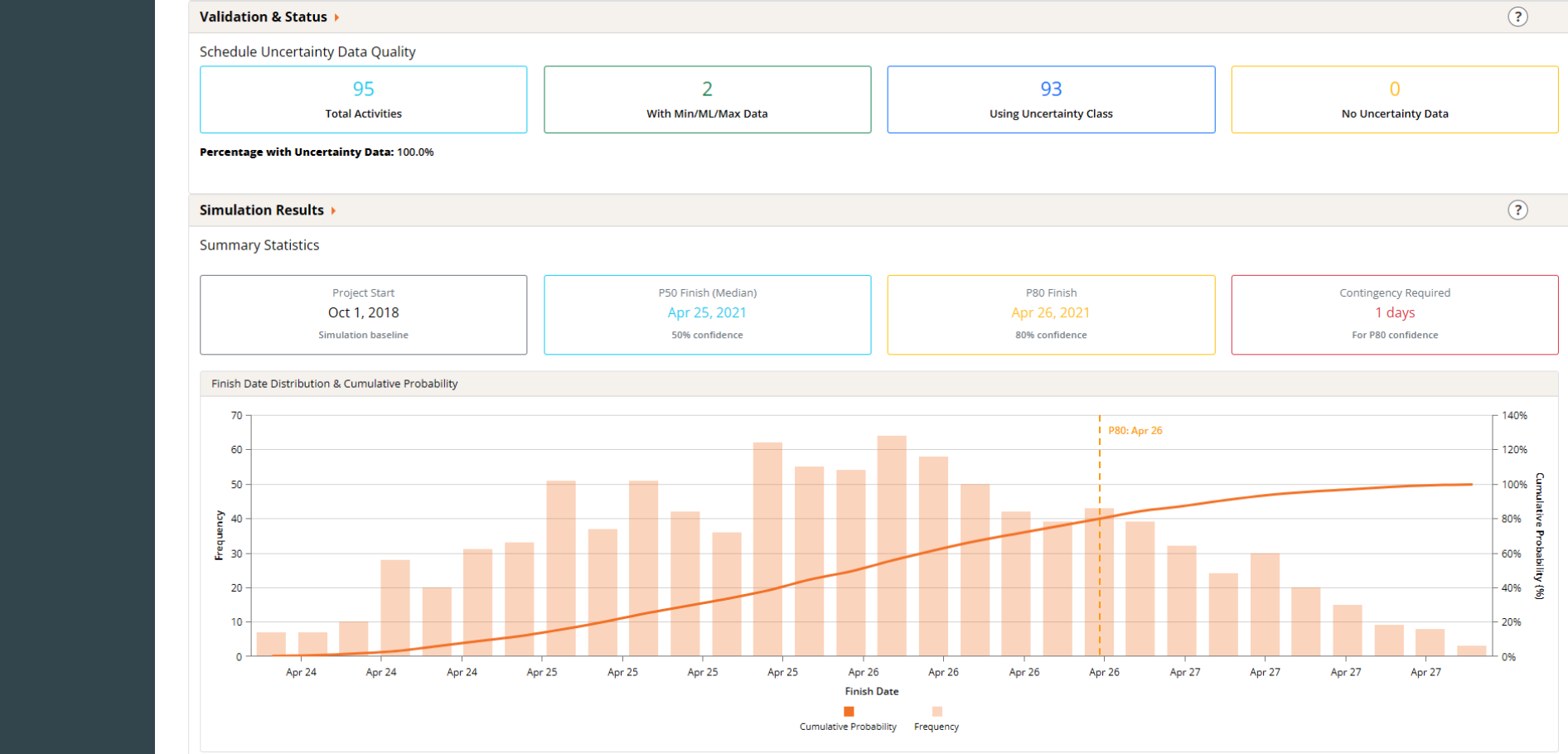
Dash360 applies the same Monte Carlo rigor to schedule risk that it brings to cost, simulating project finish dates across thousands of iterations and surfacing the schedule contingency needed to meet your confidence targets. The Validation and Status panel confirms your uncertainty data quality upfront so you know your inputs are complete before the simulation runs.
- Uncertainty data quality check first. The system shows how many activities carry min/ML/max data versus uncertainty class assignments, with a percentage complete so any gaps are visible before they affect results.
- Finish date distribution at every confidence level. P50 and P80 finish dates, a full frequency distribution, and a cumulative probability curve give your team a complete read on schedule confidence across the full range.
- Schedule contingency in plain terms. Contingency required is expressed in days at your target confidence level, giving schedule owners a simulation-backed number they can stand behind.
- Integrated with your risk register. Schedule risk simulation draws directly from the risk and uncertainty data your team already maintains, no separate input process or disconnected tool required.
WBS Dictionary Data Entry: Built for the Way Your Team Works
Every project needs a WBS Dictionary, and Dash360 makes collecting that data fast and painless. Using the same configurable field types available throughout the platform, including text fields, dropdowns, radio buttons, checkboxes, large text areas, and a full rich text editor, your administrator can build a WBS Dictionary form that captures exactly what your project requires. Set up in minutes, 100% flexible, and ready for your team without a separate document or spreadsheet in sight.